
Can You Use an IKEA KARLBY Tabletop With a Standing Desk Frame? (2026 Guide)

Thinking about turning your IKEA KARLBY desk into an electric standing desk? You may not need to replace your entire workstation.
The IKEA KARLBY countertop has become a popular choice for gaming setups, home offices and custom computer desks. Its walnut-veneer finish, generous surface area and minimalist appearance make it attractive to people who want a desk that looks more distinctive than standard office furniture.
But there is one limitation: KARLBY doesn't come with electric height adjustment.
So can you keep your existing IKEA tabletop and simply replace the legs with a standing desk frame?
Yes, an IKEA KARLBY can be used with a compatible electric standing desk frame, but not every frame will fit. The standard KARLBY measures 186 × 63.5 cm, and both its length and relatively shallow depth must be considered before choosing a height-adjustable base.
Some standing desk frames are designed for compact 100–160 cm worktops. Others support larger desktops, heavy equipment or lifting capacities up to 250 kg.
The right choice depends on your tabletop dimensions, intended equipment, mounting method and whether you're willing to modify the worktop.
In this guide, we'll explain how to turn an IKEA tabletop into a standing desk, which compatibility problems to avoid and how to choose a suitable model from the Standesk Standing Desk Frames collection.
IKEA KARLBY Standing Desk Compatibility: Quick Answer
Before buying a standing desk frame, determine which of these situations matches your project.
Your desk project | Recommended approach |
Keep an uncut 186 cm KARLBY | Obtain confirmation that a specific frame supports its full 186 × 63.5 cm dimensions |
Shorten KARLBY from 186 to 180 cm | Consider 120 kg Motus or Volta, subject to fastening and support approval |
Build a compact 100–160 cm desk | Consider Fortis with a compatible, lighter tabletop |
Build a larger gaming or office desk | Consider Invictus with a suitably sized tabletop at least 70 cm deep |
Build a heavy workstation | Consider Atlas 200 kg with an appropriately sized tabletop |
Build a four-column heavy-duty desk | Consider Atlas Pro 250 kg with a sufficiently deep, approved tabletop |
Keep a 246 cm KARLBY | Seek a specifically approved long-span or multi-column solution |
Important: These are buying directions, not blanket compatibility certifications. Even when a tabletop falls within a frame's published size range, its material, support and attachment method must also be appropriate.
For many people, a standing desk frame is the most practical way to upgrade an existing desk. But choosing the wrong frame can create unnecessary installation problems.
1. IKEA KARLBY Dimensions: What You Need to Know
IKEA offers standard walnut-veneer KARLBY countertops in two popular lengths.
Specification | KARLBY 186 cm | KARLBY 246 cm |
Length | 186 cm | 246 cm |
Depth | 63.5 cm | 63.5 cm |
Thickness | 3.8 cm | 3.8 cm |
Surface | Walnut veneer | Walnut veneer |
Core | Particleboard | Particleboard |
Main concern | Frame size and mounting | Long-span support and mounting |
These dimensions refer to the standard IKEA walnut-veneer versions. Other colours, ranges and custom-made worktops may have different specifications.
Is IKEA KARLBY Solid Wood?
No. The standard IKEA KARLBY walnut-veneer countertop is made with a particleboard core and an approximately 3 mm thick wood-veneer layer.
The construction provides the appearance of a substantial wooden worktop without requiring a solid walnut slab.
However, it is important when installing a standing desk frame.
A tabletop's total thickness does not automatically tell you which screws, threaded inserts or mounting techniques are suitable.
Do not treat a veneered particleboard countertop as if it were solid hardwood.
Why the 63.5 cm Depth Matters
Many people focus on KARLBY's length but overlook its depth. At 63.5 cm, it is shallower than the 70–80 cm minimum required by some professional and heavy-duty standing desk frames.
Tabletop depth also affects monitor positioning and viewing comfort. As a practical guideline, a 70 cm-deep desk is often suitable for 23–27-inch monitors, while an 80 cm-deep desk offers more flexibility for 32-inch displays, ultrawide monitors and dual-screen setups.
These are recommendations, not strict requirements. A monitor arm can help achieve a comfortable viewing distance even on a shallower desk.
Always consider both frame compatibility and monitor size when choosing your tabletop depth—not lifting capacity alone.
2. Which Standing Desk Frame Should You Choose?
Standesk offers standing desk frames for different workstation sizes and equipment loads, from compact desks for smaller rooms to heavy-duty four-column systems.
The best frame is not necessarily the most powerful one.
It's the frame that matches your desktop.
Fortis — Best for Small Rooms and Lighter Tabletops
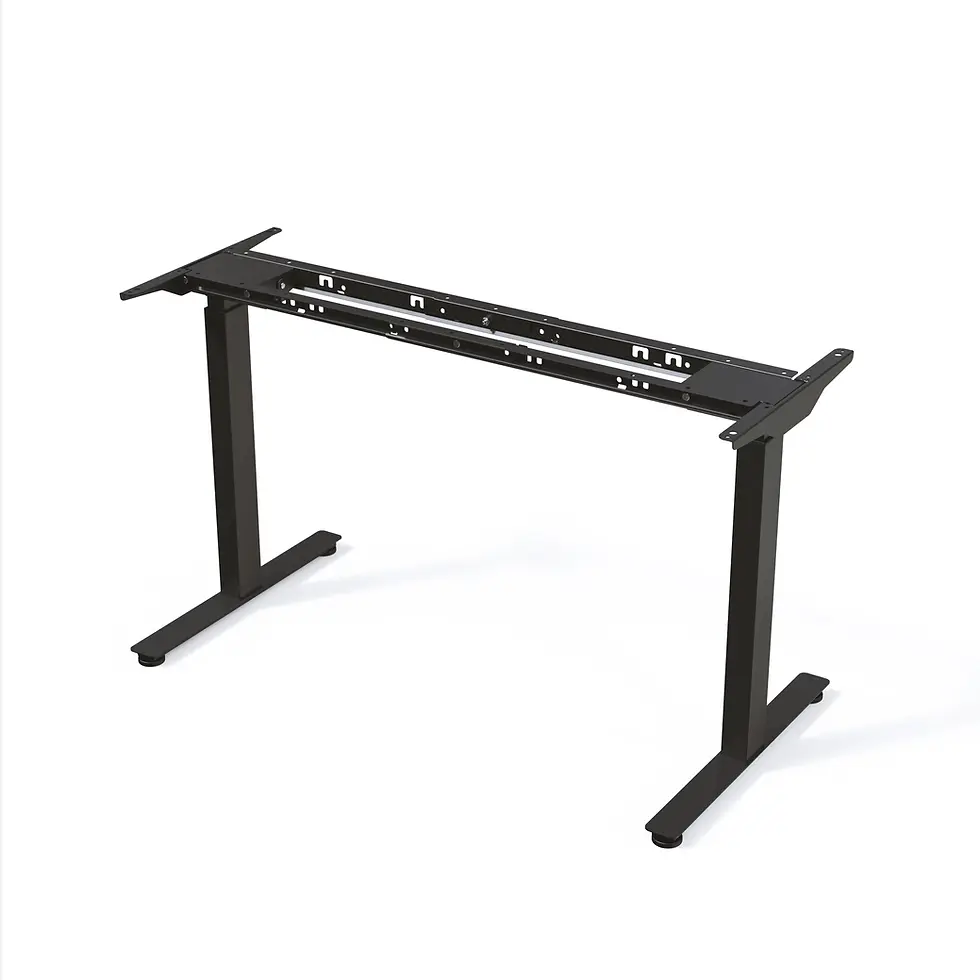
If you're building a compact workstation, the Fortis Standing Desk Frame is one of the most relevant options.
Fortis is designed for smaller home offices, study desks and spaces where a full-size workstation would be unnecessary.
Key specifications:
Maximum lifting capacity: 80 kg, including tabletop
Supported tabletop length: 100–160 cm
Supported tabletop depth: 60–80 cm
Dual-motor lifting system
Two-stage height adjustment
Compact frame design
Available in black, grey and white
Seven-year warranty

A smaller workstation with a laptop, one monitor, keyboard and mouse may not require a 120 kg or 250 kg frame.
Fortis provides an electric height-adjustable solution without designing the entire desk around heavy equipment.
Can Fortis fit an IKEA KARLBY?
Not the standard uncut 186 cm or 246 cm versions within its published size range.
Fortis supports tabletops up to 160 cm long.
You could consider a suitably modified IKEA worktop or another compatible 100–160 cm desktop, but the material and mounting requirements must still be verified.
Our recommendation: Choose Fortis when your priority is a compact, practical standing desk with a smaller and relatively light tabletop.
It's particularly useful for bedrooms, student workstations, apartments and home offices with limited space.
Motus — For Everyday Home Offices and Custom 180 cm Desks


The Motus Electric Standing Desk Frame is a logical option for a larger everyday workstation.
It provides:
120 kg maximum lifting capacity
Supported tabletop length of 100–180 cm
Supported tabletop depth of 60–80 cm
Dual-motor system
Height adjustment from 720 to 1200 mm
Three programmable memory positions
Anti-collision protection
Can Motus fit a standard IKEA KARLBY?
The 63.5 cm depth is within the published range.
However, the standard 186 cm length exceeds Motus's 180 cm maximum.
If you want to retain the original 186 cm length, obtain explicit compatibility approval rather than assuming that the extra 6 cm is acceptable.
If the KARLBY is professionally shortened to 180 cm and the mounting arrangement is approved, Motus becomes a relevant frame to evaluate.
Our recommendation: Motus is a sensible choice for a conventional home-office or gaming setup with an appropriately sized tabletop and equipment within its load rating.
Volta — For Greater Height Adjustment and Shared Workstations
The Volta Electric Standing Desk Frame offers a similar 120 kg lifting capacity but uses three-stage telescopic columns.
Its main specifications include:
120 kg maximum lifting capacity
Supported tabletop length of 100–180 cm
Supported tabletop depth of 60–80 cm
Height adjustment from 630 to 1280 mm
Dual-motor lifting system
Four memory positions
USB-A charging at the controller
Anti-collision protection
Compared with Motus, Volta provides a wider height-adjustment range.
That may be useful for taller or shorter users, or households where different people share the same desk.
The same IKEA KARLBY consideration applies: an uncut 186 cm worktop exceeds the published maximum length.
Our recommendation: Consider Volta when you want the flexibility of a larger height-adjustment range and are using a suitably sized desktop.
For a KARLBY shortened to 180 cm, confirm the mounting and support arrangement before installation.
Invictus — For Larger Desks and More Flexible Workstation Layouts

Not every customer wants a compact desktop.
If you're building a larger gaming desk, professional workstation or customised home office, the Invictus Standing Desk Frame offers a different solution.
Key specifications:
120 kg maximum lifting capacity, including tabletop
Standard tabletop lengths from 120 to 200 cm
Required tabletop depth of 70–100 cm
Adjustable frame width
Height range of approximately 585–1236 mm
Multi-column configurations for larger projects
European manufacture
Invictus is particularly relevant when you want a longer, deeper desktop rather than a compact office surface.
Does Invictus fit the standard IKEA KARLBY?
The 186 cm length falls within the published standard length range, but the KARLBY's 63.5 cm depth is below the specified 70 cm minimum.
Therefore, the unmodified countertop should not be assumed compatible.
If you're open to using a different worktop with a depth of at least 70 cm, Invictus becomes a strong option for a spacious workstation.
Longer-than-200 cm configurations require additional support columns and specific approval.
Our recommendation: Choose Invictus for larger custom desktops, multi-monitor workstations and users who want more flexibility over desk dimensions.
Atlas 200 kg — For Heavy Tabletops and Demanding Workstations

For more demanding applications, the Atlas Heavy Duty Standing Desk Frame 200kg provides a reinforced structure.
Its main features include:
Maximum lifting capacity of 200 kg
Reinforced steel crossbar
Dual-motor lifting system
Height adjustment from 610 to 1260 mm
Recommended tabletop dimensions starting at 150 × 70 cm
Published tabletop length up to 180 cm
Four memory positions
Five-year warranty
Atlas is intended for workstations with heavier desktops, multiple monitors, professional equipment and substantial accessories.
However, 200 kg lifting capacity does not mean every large tabletop is compatible.
A standard KARLBY is shallower than Atlas's recommended minimum depth and longer than its stated maximum tabletop length.
For Atlas, a properly sized custom worktop is the more appropriate starting point.
Atlas Pro 250 kg — For Maximum Lifting Capacity and Four-Column Support

At the heavy-duty end of the Standesk assortment, the Atlas Pro Heavy Duty Standing Desk Frame 250kg is designed for demanding professional workstations.
Key specifications:
Maximum lifting capacity: 250 kg
Four lifting columns
Four motors, one per column
Height adjustment from 620 to 1270 mm
Frame dimensions of 146 × 75.6 cm
Minimum recommended tabletop dimensions of 146 × 75.6 cm
Memory controller
Five-year warranty
Atlas Pro is particularly relevant for large multi-monitor workstations, engineering desks, trading setups and other equipment-intensive environments.
The four-column design distributes support differently from a conventional two-leg frame.
That makes it a sensible direction for applications requiring substantial load capacity and a different structural layout.
Is Atlas Pro compatible with IKEA KARLBY?
The standard KARLBY is only 63.5 cm deep, while Atlas Pro specifies a minimum recommended depth of 75.6 cm.
It should therefore not be presented as a direct match for the unmodified IKEA worktop.
If you're planning a heavy-duty desk, select an appropriately sized desktop that meets the frame's specifications and obtain confirmation of the complete assembly.
Our recommendation: Atlas Pro is intended for buyers whose equipment loads and desk requirements genuinely justify a four-motor, 250 kg system.
A simple laptop workstation does not need that capacity, but an equipment-intensive professional desk may benefit from it.
3. Three Practical Ways to Build Your IKEA Standing Desk
Now that we've compared the frames, let's look at the three most realistic purchasing approaches.
Option A: Keep Your Existing 186 cm KARLBY
This is the most appealing solution if you already have a KARLBY worktop and like its appearance.
However, the uncut tabletop needs a specifically approved frame configuration.
Several popular frames have a published maximum length of 180 cm, while heavier frames may require a deeper desktop.
The correct approach is to check whether a suitable frame can be specified for the exact 186 × 63.5 cm top.
Do not rely only on lifting capacity, adjustable frame width or an apparently small amount of overhang.
Best for: Owners who want to preserve their existing countertop without cutting it.
Option B: Shorten KARLBY to 180 cm
IKEA states that KARLBY worktops can be cut to length and finished with the supplied edging strip.
Shortening a standard 186 cm KARLBY to 180 cm makes its dimensions fall within the published length and depth ranges of Motus and Volta.
That is a useful advantage.
It does not automatically approve the installation, because the mounting arrangement, load distribution and suitability of the fasteners still require confirmation.
Cutting should be performed accurately, and the exposed edge must be properly finished and protected.
Best for: Buyers who want to reuse most of their KARLBY while choosing a standard electric frame designed for desktops up to 180 cm.
Option C: Choose a Custom Tabletop and the Frame That Actually Fits Your Needs
Sometimes the smartest decision is to change the worktop rather than compromise on the frame.
For example:
A compact 120–140 cm desktop can make Fortis an appropriate choice.
A 160–180 cm desktop can suit many conventional office frames.
A deeper 180–200 cm desktop can make Invictus worth evaluating.
An appropriately sized heavy desktop can justify Atlas 200 kg.
A large, demanding workstation may justify Atlas Pro 250 kg.
This approach allows you to choose the correct frame first and build the desktop around its published dimensions.
It also means you aren't restricted by the standard KARLBY's relatively shallow depth.
Best for: Buyers starting a new desk build, upgrading to heavier equipment or planning a workstation with unusual requirements.
4. How Much Weight Can an IKEA Standing Desk Support?
A frame's lifting capacity includes the weight of the tabletop and everything attached to or resting on it.
For example, consider a desktop with the following approximate equipment:
Item | Example weight |
Tabletop | 28 kg |
Two monitors | 12 kg |
Monitor arms | 7 kg |
Desktop PC | 12 kg |
Keyboard, speakers and other accessories | 6 kg |
Total | 65 kg |
These figures are illustrative, not verified weights of a particular desk setup.
A frame rated for 80 kg might have enough lifting capacity for this example, but the remaining margin would be limited.
A 120 kg frame would provide more lifting headroom if its dimensions and mounting method were suitable.
For a professional workstation with heavier equipment, a 200 kg or 250 kg frame may be worth considering.
But the lesson is important:
A higher weight rating cannot compensate for an incompatible tabletop or poor structural support.
For more detailed load calculations, see our Standing Desk Frame Weight Capacity Guide.
5. Will an IKEA KARLBY Sag or Wobble on a Standing Desk Frame?
Sagging and wobble are two different issues.
Sagging happens when a tabletop bends between support points.
Wobble is movement of the desk structure or equipment when the desk is used.
A standing desk can have a powerful motor system and still experience one or both problems.
Why Long Tabletop Spans Matter
The longer the distance between support points, the more important the tabletop construction becomes.
A 246 cm KARLBY creates different structural considerations from a compact 120 cm desktop.
IKEA's countertop instructions include requirements concerning support spacing and overhang.
Those instructions are intended for IKEA's specified worktop installations and should not be interpreted as certification for a third-party electric frame.
For a very long desktop, seek a frame-and-support arrangement approved for the intended length, material and load.
Does a Four-Leg Frame Automatically Eliminate Wobble?
No.
A four-column design can offer advantages in support layout and load distribution.
However, actual stability also depends on:
Frame geometry
Desktop dimensions and construction
Floor levelness
Assembly quality
Operating height
Equipment distribution
Monitor-arm mounting
Atlas Pro provides a four-column solution for demanding workstations, but its 250 kg lifting capacity is not a measurement of how much every possible desk assembly will wobble.
Choose the structure according to the full workstation design.
6. Can You Use a Monitor Arm With IKEA KARLBY?
A monitor arm can help free desktop space and improve screen positioning.
However, a clamped monitor arm concentrates force near the edge of the worktop.
That deserves particular attention with a particleboard-core countertop.
Before installing one, check:
Whether the arm manufacturer permits clamping to that tabletop construction.
The supported tabletop thickness.
The total weight of the monitor and arm.
Whether the chosen mounting area is sufficiently supported.
Whether a manufacturer-approved reinforcement solution is required.
An ultrawide monitor on an extended arm creates different loading conditions from a lightweight monitor on a conventional stand.
Also remember that a monitor arm moves with the standing desk.
Make sure it has enough clearance from walls, shelves and other equipment throughout the full height-adjustment range.
7. Can You Use IKEA ALEX Drawers With an Electric Standing Desk?
Yes, but the drawers must not interfere with the frame.
Many traditional IKEA desk setups place a KARLBY countertop directly on ALEX drawer units.
That arrangement changes when you install an electric standing desk frame.
The electric frame must independently support and lift the tabletop.
Stationary drawer units should not be relied upon to support a desktop while it moves.
Before installation, check that the drawers do not obstruct:
Lifting columns
Desk feet
Crossbars
Cables
Under-desk accessories
The desk's lowest position
You can retain ALEX units as storage beside or underneath the workstation when sufficient clearance exists.
8. How to Attach an IKEA Tabletop to a Standing Desk Frame
Once compatibility has been confirmed, installation should follow the frame manufacturer's instructions.
Step 1: Inspect and Measure the Worktop
Confirm the actual length, depth and thickness.
Check for warping, damaged edges, cracks and previous mounting holes.
Do not assume that an older or modified IKEA tabletop has exactly the same dimensions or condition as a new one.
Step 2: Check the Frame's Mounting Layout
Compare the mounting brackets with the underside of the tabletop.
Make sure the required attachment points are suitable for the worktop construction and that the complete support arrangement is approved.
Step 3: Choose the Correct Fasteners
The KARLBY's 3.8 cm thickness does not mean any screw shorter than 3.8 cm is suitable.
Fastener selection must account for the mounting bracket, available core material, required embedment and the applicable manufacturer's instructions.
Do not drill through the top surface or use an unapproved fastening method.
Step 4: Assemble the Frame
Follow the supplied assembly instructions.
Use the recommended sequence and tightening requirements, and make sure the frame is correctly aligned before securing the tabletop.
Step 5: Plan Cable Management
A height-adjustable desk must have enough cable length for its entire travel range.
Check the power cable, monitor connections, computer peripherals and anything mounted beneath the desk.
Cables should not become taut or enter moving parts.
Step 6: Test the Desk Before Full Use
Follow the manufacturer's setup and commissioning instructions.
Check movement through the intended height range and verify that no drawer, wall, cable or accessory obstructs the desk.
Only use the completed workstation once the mounting and overall assembly have been confirmed suitable.
9. IKEA KARLBY vs EKBACKEN vs LAGKAPTEN: Does the Material Matter?
Yes. IKEA tabletops are not all constructed in the same way.
IKEA KARLBY
KARLBY uses thick wood veneer over a particleboard core.
It offers an attractive wood appearance but requires appropriate support and mounting.
Its standard 63.5 cm depth is an important limitation for certain desk frames.
IKEA EKBACKEN
EKBACKEN is a laminate countertop with a particleboard core.
A common version measures 186 × 63.5 × 2.8 cm.
Compared with KARLBY, its thinner construction changes the available mounting depth and requires careful fastener selection.
IKEA LAGKAPTEN
LAGKAPTEN uses a lightweight construction with a honeycomb paper filling and reinforced areas intended for specified mounting arrangements.
It should not be treated as equivalent to a solid-core worktop.
Unapproved drilling or concentrated mounting loads may be unsuitable.
The buying rule: Never choose the frame or mounting hardware based only on how a tabletop looks in photographs. Confirm the actual material construction first.
10. Is It Better to Buy a Standing Desk Frame or a Complete Standing Desk?
If you already own a suitable tabletop, replacing only the frame can make financial and practical sense.
You retain the surface you like while adding electric height adjustment.
A separate frame also gives you greater flexibility over:
Desktop dimensions
Surface material and finish
Lifting capacity
Height-adjustment range
Number of lifting columns
Future workstation upgrades
A complete standing desk may be more convenient when you're starting from scratch or prefer a matched frame-and-top combination.
For someone who already owns a KARLBY, the first step should be checking whether it can be reused appropriately.
If not, choosing a different tabletop and a compatible frame can still be an attractive way to build a personalised workstation.
11. Which Standesk Frame Makes Sense for Your Workstation?
Choosing a standing desk frame should start with how you actually use your desk.
Your workstation | Frame worth considering | Main reason |
Compact laptop desk | Fortis | Small desktop compatibility, 80 kg |
Small bedroom or study desk | Fortis | Compact two-motor design |
Standard home office | Motus | 120 kg and everyday height adjustment |
Shared desk or wider height requirements | Volta | Three-stage columns and 120 kg |
Larger custom desk | Invictus | Wider tabletop configurations |
Heavy professional workstation | Atlas | Reinforced design and 200 kg |
Very heavy multi-monitor workstation | Atlas Pro | Four columns, four motors and 250 kg |
These are recommended use cases. Actual tabletop compatibility must be checked against each frame's published dimensions and mounting requirements.
A smaller desk doesn't need an oversized heavy-duty frame merely because higher capacity is available.
Equally, an equipment-intensive workstation shouldn't be designed around a compact frame if its dimensional or load requirements are exceeded.
Standesk's range is intended to cover different desk-building needs—not to force every tabletop onto one universal frame.
Final Verdict: Can You Turn IKEA KARLBY Into a Standing Desk?
Yes. An IKEA KARLBY countertop can be part of a custom electric standing desk when the selected frame and mounting arrangement are compatible.
But the dimensions matter.
The popular 186 cm KARLBY is slightly longer than the maximum specified for some standard electric frames.
Its 63.5 cm depth is also shallower than the recommended minimum for several larger and heavy-duty models.
That doesn't mean you must abandon your DIY standing desk project.
It means there are several sensible routes forward:
Keep the original KARLBY and seek an approved frame configuration.
Shorten the worktop where appropriate and choose a frame with matching dimensions.
Select a different tabletop that better suits the frame and equipment you want.
Choose a heavier or multi-column system when the actual workstation requirements justify it.
For a small room, Fortis offers a compact electric solution with an appropriate tabletop.
For everyday home offices, Motus and Volta provide 120 kg lifting capacity.
For larger desks, Invictus offers greater configuration flexibility.
For demanding professional workstations, Atlas and Atlas Pro provide heavy-duty solutions with capacities of 200 kg and 250 kg respectively.
The best DIY standing desk is not the one with the most powerful motors. It's the one where the tabletop, frame, mounting method and equipment are designed to work together.
Find Your Standing Desk Frame at Standesk.eu
Whether you're converting an IKEA countertop, building a wooden gaming desk or planning a professional multi-monitor workstation, Standesk offers electric standing desk frames for a wide range of sizes and lifting requirements.
If you're uncertain about compatibility, contact Standesk with your tabletop's length, depth, thickness, construction and approximate equipment weight.
This makes it much easier to identify which frame is worth considering before you purchase or drill any mounting holes.
Create a workstation around your needs—not around an unsuitable frame.
Standesk — Everything for a perfect workplace.
Frequently Asked Questions
Can you put an IKEA KARLBY on an electric standing desk frame?
Yes, provided the frame supports the KARLBY's dimensions, material, weight and mounting requirements. A suitable installation must be confirmed for the exact tabletop and frame combination.
Which standing desk frame fits IKEA KARLBY 186 cm?
The standard KARLBY measures 186 × 63.5 cm. Choose a frame explicitly approved for those dimensions. Some popular frames support desktops only up to 180 cm long, so the unmodified KARLBY is not automatically compatible.
Can I cut IKEA KARLBY to 180 cm for a standing desk?
Yes. IKEA states that KARLBY can be cut to length and finished with an edging strip. A 180 cm-long KARLBY falls within the published tabletop size ranges of Motus and Volta, but the mounting and support requirements still need confirmation.
Is Fortis suitable for an IKEA KARLBY standing desk?
Fortis supports tabletops from 100 to 160 cm long and 60 to 80 cm deep. The standard uncut 186 cm and 246 cm KARLBY versions exceed its length limit. Fortis is better suited to a compatible smaller worktop.
Is Fortis a good standing desk frame for small rooms?
Yes. Its compact design, 100–160 cm tabletop range and 80 kg lifting capacity make it a practical option for smaller home offices, study desks and laptop workstations when the complete setup meets its specifications.
Can I use Atlas Pro 250 kg with an IKEA KARLBY?
Do not assume so. Atlas Pro specifies a minimum recommended desktop depth of 75.6 cm, while standard KARLBY is 63.5 cm deep. A properly sized alternative desktop is the more appropriate starting point.
Can I use a 246 cm IKEA KARLBY with a standing desk frame?
Potentially, but only with a frame and support arrangement specifically approved for the long tabletop. Standard two-leg frames intended for much shorter desktops should not be assumed suitable. Long-span or multi-column configurations require careful evaluation.
Is IKEA KARLBY solid wood?
No. Standard walnut-veneer KARLBY countertops use a particleboard core with an approximately 3 mm thick veneer surface.
Will IKEA KARLBY sag on a standing desk frame?
Sagging is possible if the worktop has insufficient support, excessive overhang or concentrated loads. The support layout and tabletop construction matter as much as the frame's lifting capacity.
Can I attach a monitor arm to IKEA KARLBY?
Possibly, provided the monitor-arm manufacturer permits the tabletop construction and the mounting area is suitable. Heavy or extended monitor arms create concentrated loads that require careful assessment.
Does the standing desk frame's weight capacity include the tabletop?
Yes. The frame's rated lifting capacity includes the tabletop and all attached or supported equipment, including monitors, arms, computers and accessories.
Can I use IKEA ALEX drawers with a standing desk frame?
Yes, as stationary storage if there is sufficient clearance. The electric frame must support the tabletop independently, and the drawers must not obstruct the height-adjustment mechanism.
Which standing desk frame is better for a heavy gaming setup?
It depends on the full equipment weight and tabletop size. A reinforced 200 kg frame such as Atlas or a four-column 250 kg frame such as Atlas Pro can be appropriate for demanding workstations when the desktop dimensions and installation meet the relevant specifications.
Should I buy a standing desk frame or a complete standing desk?
Choose a separate frame if you have a compatible tabletop or want a custom workstation. Choose a complete standing desk if you prefer a matched frame-and-desktop solution with fewer compatibility and installation decisions.
Compatibility note: IKEA and Standesk are independent businesses. This guide does not imply that IKEA has approved or certified any Standesk frame for use with its worktops. Always follow the applicable manufacturers' installation, safety and warranty requirements.










Comments