
USB-C Is Taking Over: Why Your Desk and Furniture Should Be Ready
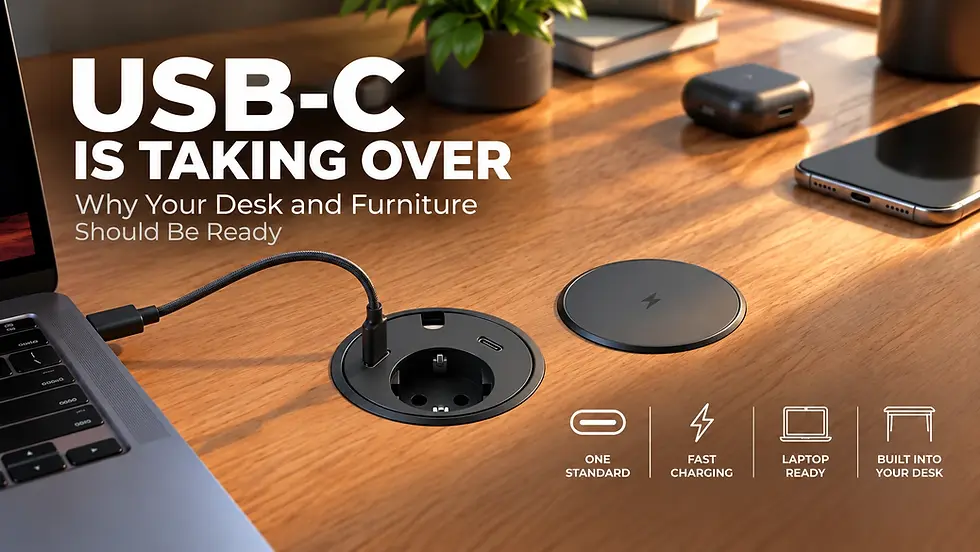
USB-C is becoming the standard connection for modern electronics. From smartphones and laptops to tablets, headphones, gaming accessories and portable devices, more products now rely on the same compact, reversible connector.
But while our gadgets are changing, many desks, meeting tables and office furniture installations still feature traditional USB-A charging ports—or no integrated charging at all.
That creates a practical question: If the devices we use every day are moving to USB-C, shouldn't the furniture we use them on evolve too?
In 2026, this question is especially relevant in Europe. The European Union's common-charger requirements now cover additional device categories, including laptops, accelerating the move toward more consistent charging connections.
For homes, offices, hotels and shared workspaces, the transition is about more than replacing one cable with another. It creates opportunities to simplify charging, reduce cable clutter and integrate power directly into furniture.
Modern solutions such as Powerdot built-in furniture sockets combine convenient power access with designs that fit into desks, meeting tables and other work surfaces.
In this guide, we'll explain why USB-C is becoming increasingly common, what the EU regulations actually require, how USB-C differs from USB-A and what to consider when upgrading your workspace.
You can also explore built-in desk power sockets and charging modules at Standesk to see how integrated charging works in modern furniture.
Quick Answer: Why Is Everything Switching to USB-C?
USB-C is becoming the preferred connector because it supports a reversible plug design and can accommodate charging, data transfer and video connections through compatible devices and cables.
Unlike older USB-A connectors, USB-C is designed to support a broad range of modern applications, including USB Power Delivery for higher-power charging.
The European Union has also introduced common-charger requirements for specific categories of electronic devices, helping standardize charging connections and reduce unnecessary charger purchases.
However, there are three important distinctions:
USB-C does not automatically mean fast charging. Charging power depends on the charger, device, cable and supported protocols.
USB-C does not guarantee high-speed data transfer. Different USB-C products support different USB data standards.
USB-A is not universally banned. Older USB-A devices, cables and charging ports remain usable.
For furniture manufacturers and workspace owners, the practical takeaway is clear: USB-C charging access is becoming increasingly useful, especially when planning new desks, meeting rooms and long-term office installations.
What Changed in 2026? Understanding the EU USB-C Charging Rules
The European Union introduced common-charger requirements to make charging more convenient and reduce fragmentation across portable electronic devices.
The rules were introduced in stages rather than applying to every electronic product at once.
December 2024: USB-C Became Mandatory for Covered Portable Devices
From 28 December 2024, covered categories of rechargeable portable devices sold in the EU have generally been required to use USB-C for wired charging.
These categories include:
Mobile phones
Tablets
Digital cameras
Headphones and headsets
Handheld video game consoles
Portable speakers
E-readers
Keyboards and mice
Portable navigation systems
Earbuds
The requirements apply to covered products placed on the EU market, subject to the regulation's scope and exceptions.
This was an important step toward allowing consumers to use compatible chargers across multiple devices.
April 2026: The Requirements Extended to Laptops
Since 28 April 2026, covered laptops placed on the EU market must also comply with the common-charger requirements.
This development is particularly relevant for office workspaces.
Laptops are among the most frequently used devices on desks, meeting tables and shared workstations. As more compatible laptops adopt USB-C charging, integrated furniture charging solutions become increasingly attractive.
However, not every built-in USB-C port can charge every laptop.
Some furniture charging modules provide 20W or 30W, which may be sufficient for phones, tablets and certain smaller devices. Many laptops require higher charging power, commonly 45W, 65W or more.
When selecting a built-in USB-C charger for laptop use, always check its power output and compatibility with the intended devices.
Does the EU Require All Electronics to Use USB-C?
No. The common-charger rules apply to defined categories of devices, not every electronic product.
They also do not require consumers to replace existing USB-A cables, chargers or older electronics.
For consumers, the transition can happen gradually as devices are replaced.
For businesses and furniture buyers, however, planning new installations around modern charging requirements can help avoid installing outdated connections in long-life furniture.
Official source: European Commission — The Common Charger
USB-C vs USB-A: What's the Difference?
USB-A and USB-C are physical connector types, but they differ in design and the capabilities commonly available through them.
USB-A has been widely used for computers, keyboards, mice, chargers and office accessories for decades.
USB-C offers a smaller, reversible connector and is used by many modern devices for charging, data and, where supported, video output.
Feature | USB-A | USB-C |
Connector shape | Larger, rectangular | Smaller, oval |
Reversible plug | No | Yes |
Common applications | Older peripherals, chargers, computers | Modern phones, laptops, tablets, peripherals |
Charging capabilities | Depends on implementation | Supports USB Power Delivery in compatible products |
Data transfer | Depends on supported USB standard | Depends on supported USB standard |
Video output | Not generally provided through standard USB-A | Possible with compatible alternate modes or protocols |
Built-in furniture charging | Common in older modules | Increasingly relevant for modern installations |
The most important point is that connector shape and technical performance are not the same thing.
A USB-C port is not necessarily faster than a USB-A port, and a USB-C charging socket does not automatically provide enough power for a laptop.
Why USB-C Is More Convenient for Everyday Charging
The reversible connector is one of USB-C's most obvious advantages. Users no longer need to check which way the plug should face.
USB-C can also reduce the number of different cable types needed across compatible devices.
For example, a modern workspace may include a USB-C smartphone, laptop, tablet, wireless mouse and headset. Depending on their charging requirements, several of these devices may be charged using compatible USB-C equipment.
This is particularly useful in shared offices, meeting rooms and hospitality environments, where users bring different devices.
Is USB-C Always Faster Than USB-A?
No.
USB-C describes the connector, while data-transfer performance depends on the USB specification supported by the connected devices and cable.
Some USB-C connections operate at basic USB 2.0 speeds, while others support much faster standards.
Similarly, charging performance depends on the supported power-delivery system.
When choosing USB-C equipment, check the actual specifications rather than assuming all USB-C ports provide identical capabilities.
USB-C Charging vs USB Power Delivery: What You Need to Know
USB Power Delivery, commonly abbreviated as USB PD, is a charging specification that allows compatible devices and chargers to negotiate suitable power levels.
This matters when choosing a desk-mounted charging socket.
A built-in USB-C charger rated at 20W may be suitable for many smartphones, while a 65W USB-C PD solution can support a wider range of compatible laptops.
Higher-power charging is possible with appropriately designed USB-C PD equipment, but the port, power supply, cable and device must all support the required power level.
For furniture installations, always verify the rated output of the complete charging module—not simply the presence of a USB-C connector.
Why the USB-C Transition Matters for Desks and Office Furniture
Most people replace smartphones and laptops more frequently than they replace desks or office furniture.
A quality desk may remain in use for many years, while the devices connected to it can change several times.
This difference in replacement cycles creates a challenge for furniture with integrated technology.
A desk equipped only with older USB-A charging ports may still function perfectly, but those ports may become less convenient as more users adopt USB-C devices and cables.
Furniture Charging Should Match Modern Devices
Integrated power sockets allow users to connect or charge devices directly at the work surface without reaching under the desk or relying entirely on separate charging adapters.
This can be especially useful for:
Home offices with multiple portable devices
Meeting rooms where employees bring their own laptops
Shared workstations and coworking spaces
Reception desks and waiting areas
Hotels and hospitality furniture
Educational and collaborative workspaces
A well-chosen charging module can provide convenient access while helping keep cables and adapters organized.
USB-C Is an Opportunity to Upgrade, Not a Reason to Replace Every Desk
Moving toward USB-C does not mean existing furniture must be discarded.
Some built-in furniture power modules use standardized mounting-hole dimensions, potentially allowing an older charging unit to be replaced with a newer model.
For example, Powerdot offers furniture-integrated charging solutions with different combinations of AC power sockets, USB-A connections and USB-C charging ports.
The suitability of an upgrade depends on mounting dimensions, installation depth, electrical requirements and the specifications of the existing furniture.
In the next section, we'll compare different Powerdot configurations and explain how to choose the right USB-C charging solution for phones, laptops, meeting rooms and modern office furniture.
How Much USB-C Charging Power Do You Actually Need?
One of the most important considerations when choosing a USB-C charging socket is its power output.
Two furniture sockets may look almost identical, yet one might provide 20W charging while another supports 65W or more. This difference determines which devices can charge effectively and whether the socket can support a laptop.
USB-C charging power is measured in watts (W). Higher wattage allows compatible devices to draw more power, but the actual charging speed depends on the device, charger, cable and supported charging protocol.
USB-C Charging Wattage Explained
USB-C Power Output | Typical Applications | What to Consider |
15–20W | Smartphones, earbuds, wireless accessories | Suitable for many everyday charging needs |
30W | Smartphones, tablets, smaller laptops | Laptop compatibility varies |
45W | Tablets and selected USB-C laptops | May be insufficient for power-hungry laptops |
65W | Many everyday business laptops | A practical target for laptop-focused workspaces |
100W | Higher-power laptops and workstations | Requires compatible USB PD equipment and cables |
120W+ | Multiple devices or specialized charging systems | Check per-port output, not just total rated power |
These figures are general guidance, not universal compatibility guarantees.
For example, a laptop designed for a 65W adapter might charge slowly or lose battery power during demanding workloads when connected to a 30W USB-C source.
Likewise, a 100W charger does not force 100W into a smartphone. Compatible USB Power Delivery equipment negotiates an appropriate charging level.
Why Shared USB-C Charging Power Matters
Some furniture charging modules feature two USB-C ports.
However, two USB-C ports do not necessarily mean twice the advertised charging power.
A dual-port module might distribute its available power between connected devices. Its maximum output may also change depending on whether one or both ports are in use.
Before purchasing a dual USB-C furniture socket, check:
Maximum power output per port
Combined power output when both ports are occupied
USB Power Delivery support
Compatibility with the devices being charged
Whether the power supply is integrated or requires an external adapter
These details are particularly important in meeting rooms, where two users may need to charge devices simultaneously.
Built-In USB-C Furniture Sockets: What Is Powerdot?
Powerdot is a range of furniture-integrated power and connectivity modules designed to bring electrical connections directly to the work surface.
Instead of relying exclusively on power strips underneath a desk, a Powerdot module can provide accessible charging or power connections through a dedicated opening in the furniture.
Depending on the model, Powerdot modules may include conventional AC sockets, USB-A charging, USB-C charging, cable pass-through openings or other connections.
Their compact design makes them suitable for desks, meeting tables, reception counters and selected hospitality or shared-workspace installations.
Explore the Powerdot and desk power socket range at Standesk.
Why Choose a Built-In Furniture Charging Socket?
A built-in charging module offers several practical advantages.
1. Easier access to power
Users can connect devices at desk level without reaching underneath furniture or searching for an available wall socket.
2. Less visible cable clutter
Charging cables can connect directly to the work surface, reducing the need for loose adapters and extension leads.
3. Better integration with furniture
Powerdot modules are designed to fit into prepared openings, creating a more integrated appearance than a separate charger resting on the desk.
4. Flexible charging configurations
Different models support different combinations of AC power, USB-A and USB-C, allowing the installation to match its intended users.
5. Potential for future upgrades
Some older modules may be replaceable with newer configurations when mounting dimensions and electrical requirements are compatible.
This last point is especially relevant as USB-C becomes increasingly common.
USB-A to USB-C: How Powerdot Furniture Sockets Are Evolving
Traditional built-in desk charging solutions often included USB-A ports because they matched the charging cables used by smartphones and other portable devices at the time.
Newer Powerdot configurations increasingly incorporate USB-C charging to accommodate modern equipment.
The transition is visible when comparing different Powerdot models.
Powerdot 14: Traditional USB-A Charging
The Powerdot 14 socket with two USB-A chargers represents an earlier approach to integrated furniture charging.
It combines a conventional power connection with USB-A charging access in a desk-mounted module.
This configuration remains useful for workplaces with older charging cables and accessories.
However, users whose devices have USB-C charging cables may need a USB-A-to-USB-C cable or a different charging solution.
For new furniture installations intended to remain in service for several years, it makes sense to evaluate USB-C alternatives.
Powerdot 17: Two USB-C Charging Ports
The Powerdot 17 with two USB-C charging ports illustrates the transition toward modern integrated charging.
With two USB-C connections, it is particularly relevant for meeting tables, shared workspaces and furniture used by people with multiple portable devices.
The listed configuration specifies two 30W USB-C charging connections. Buyers should verify the available output when both ports are used simultaneously.
Powerdot 17 is designed for a 79 mm mounting opening, making it an interesting alternative to certain older Powerdot configurations that use the same nominal hole diameter.
Important: Matching mounting-hole dimensions do not automatically guarantee that two modules are interchangeable. Installation depth, tabletop thickness, power connections and manufacturer instructions must also be checked.
Powerdot 14 vs Powerdot 17: Which Makes More Sense?
Feature | Powerdot 14 | Powerdot 17 |
USB charging connectors | Two USB-A | Two USB-C |
Intended use | Legacy USB charging | Modern USB-C charging |
Nominal mounting-hole diameter | 79 mm | 79 mm |
Suitable for new USB-C-focused workspaces | Less convenient | More convenient |
Best reason to choose | Existing USB-A devices and cables | USB-C devices and modern charging needs |
Neither option is automatically wrong.
For an existing installation with older equipment, USB-A may still be practical. For new office furniture, however, USB-C is generally the more forward-looking choice.
Which Powerdot USB-C Socket Should You Choose?
Not every desk requires the same charging solution.
A home office, a conference table and a hotel bedside cabinet may have very different requirements.
Powerdot offers several configurations that address these different use cases.
Powerdot Compact 62: AC Power and USB-C in One Module
The Powerdot Compact 62 socket with USB-C charging combines a conventional power socket with USB-C charging in a compact furniture-mounted design.
Its listed USB-C charging capacity is 30W, and the module uses a nominal 60 mm mounting opening.
This combination is useful when users need access to both a traditional electrical outlet and convenient USB-C charging.
Best suited for: Individual desks, compact workstations and meeting spaces where an AC socket and USB-C charger are both useful.
A 30W USB-C connection can support many smartphones and tablets, but users should not assume it will provide sufficient power for every laptop.
Powerdot Mini 52: Compact Dual USB-C Charging
The Powerdot Mini 52 USB-C charger provides two USB-C charging connections in a compact module designed for a nominal 51 mm mounting opening.
Its listed charging capacity is up to 30W. The exact power distribution between ports should be confirmed for the selected configuration.
Because the module focuses on USB-C charging rather than a full-size AC socket, it can be particularly useful where furniture space is limited.
Best suited for: Meeting tables, reception areas, lounge furniture and other locations where charging portable devices is the primary requirement.
Powerdot Nano 01: USB-C Charging for Different Power Requirements
The Powerdot Nano 01 USB-C furniture charging kit offers a different approach to integrated charging.
It uses a compact 19 mm mounting opening and is offered in kit configurations associated with 20W, 65W and 120W charging solutions.
This allows buyers to select a configuration based on the intended application.
For example:
20W configuration: Everyday charging for compatible smartphones and smaller devices.
65W configuration: A more suitable starting point for many USB-C business laptops.
120W configuration: Higher-power applications, subject to the exact kit specifications and supported output.
The rated wattage of a complete kit should not be confused with the guaranteed output of every individual USB-C connection.
Best suited for: Furniture projects where a compact charging connection is preferred and the required power level can be selected during installation.
Powerdot 16: A Transitional USB-A and USB-C Configuration
The Powerdot 16 with USB-A and USB-C connections is another example of how furniture connectivity has evolved.
However, an important distinction applies to this model.
Its USB-C connection is a pass-through connection rather than an independent, integrated high-power USB-C charger. Charging functionality depends on the compatible equipment connected behind the module.
This makes it essential to distinguish between a USB-C charging socket and a USB-C connection point.
A port that looks like USB-C does not necessarily provide USB Power Delivery.
Powerdot USB-C Comparison: Choosing the Right Configuration
Powerdot Model | Main Connections | Nominal Mounting Hole | Recommended Application |
Powerdot 14 | AC + two USB-A charging ports | 79 mm | Existing USB-A installations |
Powerdot 17 | Dual USB-C charging configuration | 79 mm | Meeting rooms and shared desks |
Compact 62 | AC + 30W USB-C | 60 mm | Individual workstations |
Mini 52 | Dual USB-C, up to 30W | 51 mm | Compact furniture charging |
Nano 01 | USB-C charging kit, multiple power options | 19 mm | Compact installations, including selected laptop charging applications |
Powerdot 16 | AC + USB-A + USB-C pass-through | Check selected version | Mixed legacy and modern connectivity |
Specifications and available configurations can vary by model version. Always confirm the exact product variant, power requirements and installation instructions before ordering.
For the complete selection, visit Desk Power Sockets & Modules at Standesk.
Can You Upgrade an Existing USB-A Desk Socket to USB-C?
In some cases, yes.
Replacing an older furniture charging module may be possible without replacing the desk itself.
For example, if an existing desk has a Powerdot module installed in a 79 mm opening, another compatible module designed for the same nominal opening may be worth considering.
However, an upgrade should never be based on hole diameter alone.
What to Check Before Replacing a Furniture Power Socket
1. Mounting-hole diameter
Measure the existing opening and compare it with the new module's installation requirements.
2. Tabletop thickness
Confirm that the new module supports the thickness of the desk or table surface.
3. Clearance underneath the furniture
Some charging modules require additional space for their housing, power supply or cables.
4. Electrical compatibility
Check the power connection, grounding requirements, voltage rating and installation instructions.
5. USB-C charging capacity
Choose a charging output suitable for the intended devices, rather than selecting a module solely because it has USB-C ports.
6. Access to the power supply
Some USB-C charging solutions use external power supplies or separate components. Make sure the complete system can be installed safely and accessed for maintenance.
Where fixed electrical connections or modifications are involved, installation should be handled by a suitably qualified professional.
Is It Worth Replacing USB-A with USB-C?
If your current USB-A charging ports still meet your needs, there is no urgent reason to replace them.
However, upgrading may make sense when renovating an office, purchasing new furniture, refurbishing meeting rooms or replacing an existing damaged charging module.
For new installations, choosing USB-C charging with an appropriate power rating can help make the furniture more convenient for the devices people are likely to use over the coming years.
The objective is not simply to install the newest connector. It is to create a workspace with accessible, reliable charging that matches the needs of its users.
Where Are Built-In USB-C Charging Sockets Most Useful?
USB-C charging is no longer relevant only to personal electronics. As more devices adopt the connector, convenient charging access is becoming an important consideration in the design of offices, meeting rooms, hotels and home workspaces.
Built-in furniture sockets help make charging accessible without requiring users to search for wall outlets or place separate power adapters across the work surface.
However, the ideal solution depends on where the furniture is installed, which devices people use and how much charging power they require.
1. Office Desks and Individual Workstations
A typical office desk may accommodate a laptop, smartphone, wireless headset, keyboard, mouse and other accessories.
While not every device needs constant charging, having accessible power at desk level can simplify everyday work.
A furniture-integrated module combining a conventional AC outlet and USB-C charging is particularly practical.
For example, the Powerdot Compact 62 combines an AC connection with a 30W USB-C charger.
This allows users to charge compatible mobile devices directly while keeping an AC outlet available for equipment requiring a conventional power adapter.
For workplaces where laptop charging through USB-C is a priority, higher-power configurations should be considered.
A 65W solution may be appropriate for many business laptops, while some performance-oriented models require more power.
Workspace recommendation: Choose a built-in power module based on the devices used at the workstation, then combine it with effective desk cable management to organize power and data cables.
2. Meeting Rooms and Conference Tables
Meeting rooms are one of the strongest applications for integrated USB-C charging.
Employees and visitors often bring smartphones, tablets and laptops, and they may need to connect or charge these devices during meetings.
Without accessible charging, users may rely on extension leads or adapters connected to distant wall outlets.
A built-in charging module offers a more convenient alternative.
The Powerdot 17 with two USB-C charging ports is worth considering for shared tables where users need USB-C access.
For laptop-focused conference rooms, however, the charging output should be checked carefully. Two 30W charging connections should not be assumed to replace two full-power laptop chargers.
Meeting rooms may also require USB-C data, display or docking connectivity.
Important: A USB-C charging port is not automatically a USB-C docking connection. If users need to connect external monitors, transfer data or use a docking station, those functions must be supported by the complete installation.
3. Hotels, Guest Rooms and Hospitality Furniture
Hotel guests increasingly travel with USB-C smartphones, tablets, headphones and other rechargeable devices.
Accessible charging near a bedside table, desk or seating area can improve convenience without requiring guests to find an available wall outlet.
Compact furniture-integrated solutions are particularly relevant where space is limited.
For example, the Powerdot Mini 52 dual USB-C charger can provide charging access without occupying the same surface area as a separate charging adapter.
For hospitality projects, consider durability, ease of cleaning, charging compatibility and whether the module can be serviced or replaced without modifying the furniture.
4. Home Offices and Gaming Setups
Home workspaces often contain a mixture of devices: laptops, smartphones, gaming mice, headsets, controllers and other accessories.
Many newer peripherals use USB-C for charging, even when they communicate wirelessly during normal use.
A built-in USB-C charging socket can help keep charging cables accessible without permanently occupying a computer's USB ports.
This is especially useful for desks with limited accessible wall outlets.
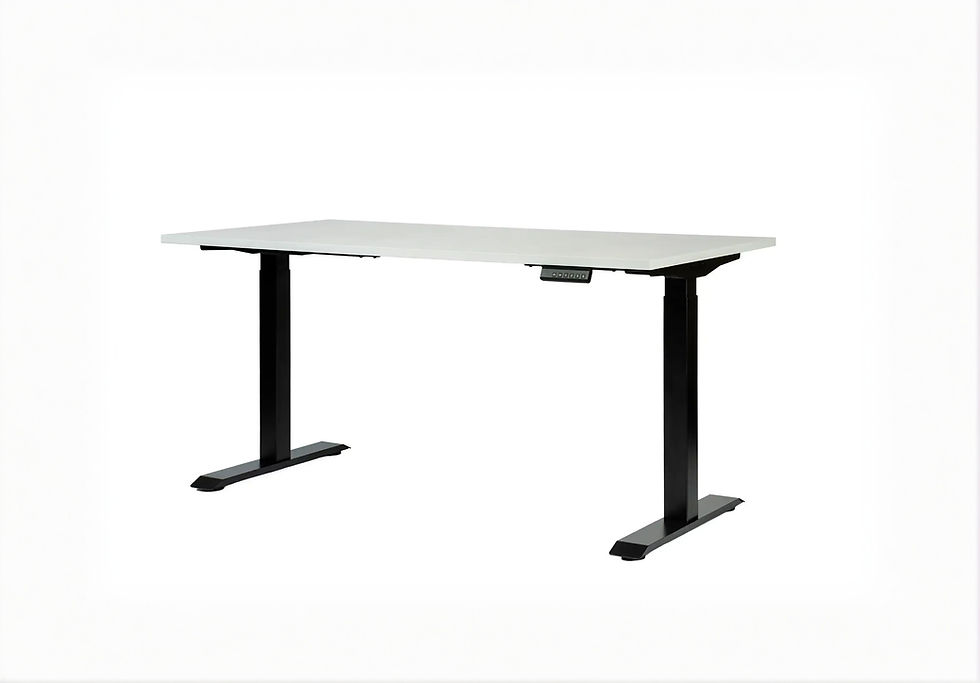
For users planning a complete workspace, combining a standing desk with suitable desk power modules and cable management can create a more organized setup.
The key is to plan cable routing carefully, particularly on height-adjustable desks. Power cables must have sufficient slack and be secured so they cannot become trapped or stretched as the desk moves.
5. Coworking Spaces, Libraries and Shared Furniture
Shared environments accommodate users with different devices and charging requirements.
USB-C charging access can reduce dependence on device-specific charging adapters, but it does not eliminate compatibility considerations.
For example, a shared desk designed primarily for smartphone charging may need only a modest USB-C power output.
A workstation intended for laptop users may require significantly higher power.
When specifying charging modules for shared furniture, consider the expected device types, number of simultaneous users and long-term maintenance requirements.
USB-C Desk Charging: Common Buying Mistakes to Avoid
USB-C is convenient, but the connector alone does not tell you everything about a charging solution.
Here are the most common mistakes to avoid when selecting built-in USB-C furniture sockets.
Mistake 1: Assuming Every USB-C Port Supports Fast Charging
USB-C describes the connector, not a guaranteed charging speed.
A port may support relatively low-power charging, USB Power Delivery or other capabilities depending on its design.
What to do: Check the manufacturer's rated charging output and supported charging specifications.
Mistake 2: Choosing 30W Charging for Every Laptop
A 30W USB-C charger may be sufficient for certain smaller laptops, but many business and performance laptops require more power.
A laptop may charge slowly, charge only while sleeping or continue losing battery power during demanding use if the available power is insufficient.
What to do: Check the laptop's recommended charging wattage and choose a compatible USB-C PD solution.
Mistake 3: Confusing USB-C Charging with USB-C Data Connectivity
Some furniture modules provide USB-C charging only.
Others offer pass-through connections that depend on external equipment.
A USB-C port on a desk does not automatically support external monitors, docking stations or high-speed data transfer.
What to do: Determine whether the installation needs charging, data, video or a combination of these functions.
Mistake 4: Ignoring Power Sharing Between Multiple Ports
Dual-port charging modules may have a shared power budget.
A product advertised with two USB-C ports might not provide its maximum single-port output through both connections simultaneously.
What to do: Check the per-port and combined power ratings for the exact model.
Mistake 5: Selecting a Furniture Socket Without Checking Installation Dimensions
Built-in power modules require suitable mounting openings, tabletop thickness and clearance underneath the furniture.
Even two modules with the same nominal mounting-hole diameter may have different installation requirements.
What to do: Review the manufacturer's installation drawings before cutting or modifying furniture.
Mistake 6: Forgetting About Cable Quality
USB-C cables can differ in supported charging power, data-transfer capabilities and construction.
A cable suitable for charging a smartphone may not support the power required by a higher-wattage laptop.
What to do: Use appropriately rated cables from reputable manufacturers, particularly for higher-power USB PD applications.
Mistake 7: Installing Power Without Planning Cable Management
A built-in socket improves access to charging, but the cables still need a safe route to their power source.
This is especially important for height-adjustable desks and furniture with moving components.
What to do: Plan cable routing, strain relief, clearance and accessibility before installation.
How to Future-Proof Your Desk Charging Setup
Future-proofing does not mean predicting every future connector or charging standard.
It means selecting furniture infrastructure that can remain useful as devices change.
For most new installations, the following approach is practical.
Prioritize USB-C, but Keep AC Power Available Where Needed
USB-C charging is increasingly useful for portable electronics, but conventional power sockets remain essential for many devices.
Monitors, desktop computers, larger laptop adapters and other equipment may still require AC power.
A combination of AC outlets and USB-C charging is therefore often more versatile than a USB-C-only installation.
Choose Charging Power Based on Real Device Requirements
A charging module for smartphones does not need the same output as a module intended for business laptops.
Where possible, consider the expected requirements of future users as well as current equipment.
For shared workstations, higher-power USB-C PD solutions may provide more flexibility, provided the overall electrical design supports them.
Consider Replaceable or Serviceable Modules
Furniture often lasts longer than the electronic devices used with it.
A design that allows charging modules to be accessed, serviced or replaced may be more practical than permanently integrating technology that cannot be upgraded.
Powerdot's different configurations and mounting formats illustrate why modular furniture power solutions deserve consideration during workspace planning.
Avoid Replacing Functional Equipment Unnecessarily
USB-A will remain useful for many existing devices.
The transition toward USB-C does not require every older charging module to be replaced immediately.
When equipment is functioning correctly, replacement should be based on genuine compatibility, convenience or maintenance needs.
For new furniture purchases and renovations, however, USB-C should be part of the planning process.
Frequently Asked Questions About USB-C and Desk Charging
Is USB-C replacing USB-A completely?
USB-C is increasingly common on new electronic devices, but USB-A is not disappearing immediately. Many computers, chargers and accessories still use USB-A, and existing equipment remains usable.
Is USB-C mandatory in the European Union?
EU common-charger requirements apply to specified categories of devices that support wired charging. The rules began applying to covered portable devices in December 2024 and extended to covered laptops in April 2026. They do not require every electronic product to use USB-C.
Does every USB-C port support fast charging?
No. USB-C is a connector type. Charging speed depends on the port's power rating, supported charging protocol, cable and connected device.
Can a 30W USB-C desk socket charge a laptop?
Some laptops can charge from a 30W USB-C source, but many require 45W, 65W or more. Always check the laptop's power requirements and the socket's specifications.
Is 65W USB-C enough for a laptop?
A compatible 65W USB-C PD charger is sufficient for many everyday business laptops. However, some laptops require higher power, especially during demanding workloads.
Can one USB-C cable charge all my devices?
One compatible USB-C cable may work with several devices, but not all USB-C cables support the same charging power, data speeds or video capabilities. Always check cable and device requirements.
What is a built-in USB-C desk socket?
A built-in USB-C desk socket is a charging or connectivity module installed into a prepared opening in a desk, table or other furniture surface. Depending on the model, it may provide USB-C charging, AC power or additional connections.
What is the difference between a USB-C charger and a USB-C pass-through port?
A USB-C charger provides charging power through an integrated or connected power supply. A pass-through port extends a connection to external equipment and does not necessarily provide independent charging power.
Can I replace an existing USB-A furniture socket with USB-C?
Sometimes. Replacement depends on mounting dimensions, tabletop thickness, electrical connections and the specifications of the new module. Matching hole diameters alone do not guarantee compatibility.
Are Powerdot sockets suitable for standing desks?
Powerdot modules can be used in compatible standing desk tabletops when their mounting and installation requirements are met. Cable routing must allow the desk to move safely through its full height range.
Can I install a Powerdot socket myself?
Installation requirements depend on the specific module and electrical configuration. Furniture drilling may require suitable tools, while electrical connections or modifications should be performed by a qualified professional where required.
Do dual USB-C furniture sockets charge two devices at full speed?
Not necessarily. Some chargers share their total available power between ports. Check the maximum output per port and the combined output when both are used.
Are USB-C desk sockets useful in hotels and meeting rooms?
Yes. They provide convenient charging access for compatible smartphones, tablets and other portable devices. For laptop-focused spaces, select modules with sufficient USB-C Power Delivery capacity.
Is USB-C better than USB-A for new office furniture?
For many new installations, USB-C is the more practical choice because it matches an increasing range of modern devices. However, AC outlets and sometimes USB-A connections may still be useful depending on the workplace.
Final Thoughts: USB-C Is Changing More Than Our Charging Cables
The transition from USB-A to USB-C is not just about a different connector.
It reflects a broader move toward more consistent charging connections across smartphones, laptops, tablets and everyday electronic accessories.
With the EU's common-charger requirements now covering laptops as well as other specified portable devices, USB-C has become an increasingly important consideration for modern workspaces.
But the right charging solution involves more than choosing a USB-C port.
Charging wattage, Power Delivery support, installation dimensions, electrical compatibility and the needs of the people using the furniture all matter.
For new desks, meeting rooms and hospitality projects, built-in USB-C charging can provide convenient power access while helping keep work surfaces organized.
For existing furniture, upgrading an older USB-A module may be possible without replacing the entire desk, provided the new installation is compatible.
Powerdot offers a range of furniture-integrated charging solutions, from compact USB-C connections to modules combining conventional AC sockets and USB-C charging.
Explore USB-C Charging and Desk Power Solutions at Standesk
Planning a new office, upgrading a meeting table or looking for a cleaner way to charge devices at your desk?
Explore the relevant Standesk categories:
Desk Power Sockets & Modules — Built-in furniture power sockets, USB charging modules and Powerdot solutions.
Cable Management — Accessories for organizing power and connection cables.
Standing Desks — Height-adjustable desks for modern workspaces.
Desktop Accessories — Practical additions for organizing and improving your workspace.
The best desk charging setup is not necessarily the one with the most ports. It is the one that delivers the right power, in the right place, for the devices people actually use.




















Comments