
Best Mini PCs for Office Work in 2026 — Fast, Quiet & Space-Saving
Updated: Dec 22, 2025
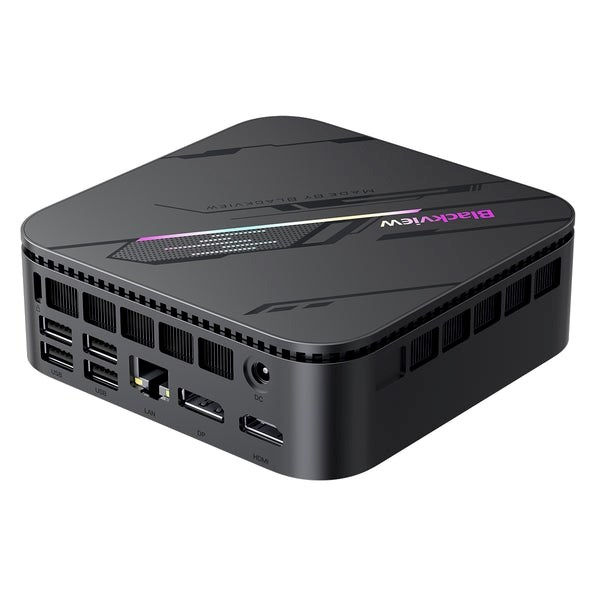
Mini PCs have become one of the fastest-growing categories in office technology. In 2026, professionals want computers that are fast, quiet, energy-efficient and small enough to fit any workspace — especially home offices where every centimeter matters.
Modern mini PCs are no longer “low power” or “office only.” Many outperform full-sized desktops while using a fraction of the space. Whether you manage spreadsheets, handle heavy multitasking, work with large documents or run business applications, a well-chosen mini PC can easily replace a traditional tower.
This guide explains the key features to look for, why mini PCs are becoming the new standard for office productivity, and how to choose the right model based on your work style.
Why Mini PCs Are Perfect for Office Work in 2026
Mini PCs solve several modern workspace challenges:
1. Space-saving design
They fit under a monitor, behind one, or mount directly to the back using VESA brackets. This helps keep your workspace clean and organized.
2. Quiet and energy-efficient
Modern processors use advanced efficiency cores, allowing systems to stay cool and quiet even during demanding tasks.
3. Strong performance for everyday and professional work
Thanks to high-performance mobile and desktop-grade CPUs, NVMe storage and fast memory, mini PCs easily handle:
multitasking
large spreadsheets
online meetings
productivity apps
business management software
4. Perfect match for modern peripherals
Mini PCs pair ideally with:
USB-C monitors
docking stations
monitor arms
cable-managed minimalist desks
5. Easy to upgrade
Most models allow upgrades of RAM and NVMe storage, extending lifespan and improving performance.
Key Features to Look For in a Mini Office PC (2026)
Processor (CPU)
For office productivity, look for:
Intel Core i5 / i7 (12th–15th gen)
AMD Ryzen 5 / Ryzen 7 (5000–8000 series)
Apple M2/M3 (Mac Mini)
For heavier workloads:
AMD Ryzen 7 Pro
Intel Core Ultra series
RAM
16 GB is the sweet spot
32 GB recommended for multitasking, design tools or many browser tabs
Storage
NVMe SSD required (fast boot, fast file loading)
512 GB minimum
1 TB ideal for long-term use
Connectivity
Look for:
USB-C or Thunderbolt
HDMI + DisplayPort (for 2–3 monitor setups)
Multiple USB-A ports
Wi-Fi 6 or 6E
Ethernet port
Noise & Cooling
Choose models known for efficient cooling — essential for long office sessions.
Mounting Options
VESA-compatible mini PCs allow incredible desk setups with zero clutter.
Best Mini PC Use Cases for Office Work
General office work (emails, writing, spreadsheets)
A mid-range Intel or AMD mini PC is more than enough.
Heavy multitasking, virtual meetings, large files
Choose a device with stronger multi-core performance and 16–32 GB RAM.
Design, data analytics or business software
Look for workstation-level mini PCs with upgraded cooling.
Small-space home offices
Mini PCs shine here — clean, compact, quiet.
Advantages of Mini PCs Over Traditional Desktops
Feature | Mini PC | Standard Desktop |
Space | Extremely compact | Requires large floor/desk area |
Noise | Very quiet | Often louder |
Power consumption | Low | Higher |
Upgrade options | Moderate (RAM + storage) | Extensive |
Performance | High for most office tasks | Highest for extreme workloads |
Price | Very competitive | Often higher |
For 90% of office users, a mini PC is the smarter, more efficient choice in 2026.
If you’re still deciding between a compact system and a traditional tower, our detailed comparison of mini PCs vs traditional desktops for productivity in 2026 breaks down performance, noise, space efficiency and long-term value
Who Should Choose a Mini PC?
Mini PCs are ideal for:
home office workers
freelancers
small business setups
students
hybrid remote workers
professionals using multiple monitors
teams needing standardized workstations
They’re also perfect for companies replacing bulky desktops with minimal, stylish, cable-managed workstations.
If you want to understand which specifications, ports, and configurations matter most for your workflow, see our full guide on how to choose a mini PC for work in 2026.
FAQ — Best Mini PCs for Office Work 2026
1. Are mini PCs powerful enough for office work?
Yes — modern mini PCs easily handle multitasking, spreadsheets, meetings and productivity apps.
2. Can a mini PC support two or three monitors?
Most models can run dual displays, and many support 3–4 monitors through USB-C, HDMI and DisplayPort.
3. Do mini PCs overheat?
Good models have efficient cooling. Choose brands known for stable thermals.
4. Is a mini PC better than a laptop for office work?
For stationary work, yes — mini PCs offer more performance per euro, better cooling and easier upgrades.
5. Can mini PCs run professional apps?
Yes. With enough RAM and a strong CPU, they handle design tools, analytics, business apps and browser-heavy workflows.






























Comments