
Best Standing Desk Frame for Home Office and Gaming in 2026 — 7 Buying Mistakes to Avoid

Quick answer: what is the best standing desk frame in 2026?
The best standing desk frame in 2026 is a stable electric frame with enough weight capacity for your tabletop, monitors and accessories, a height range that fits your sitting and standing posture, smooth lifting, memory presets and good cable-management options.
For most home office and gaming setups, a dual-motor 2-leg standing desk frame is the safest choice. It gives better lifting power, smoother adjustment and more long-term flexibility than a basic single-motor frame.
For large tabletops, L-shaped desks, heavy workstations, triple-monitor setups or studio-style setups, a 3-leg standing desk frame or heavy-duty standing desk frame usually makes more sense.
The biggest mistake is choosing only by price. A standing desk frame is the base of the whole setup. If the frame is unstable, too weak or not compatible with your tabletop, even a good chair, monitor arm or gaming setup will feel worse than it should.
Your setup | Best standing desk frame direction |
Laptop-only home office | Basic electric frame or light dual-motor frame |
Standard home office | Dual-motor 2-leg frame |
Dual monitors + monitor arm | Dual-motor frame with higher load capacity |
Gaming setup with large mousepad | Stable dual-motor frame with wide tabletop support |
Heavy tabletop | Heavy-duty standing desk frame |
L-shaped workstation | 3-leg standing desk frame |
Shared workspace | Dual-motor frame with memory presets |
If you are comparing options now, start with standing desk frames and match the frame to your real setup, not only to the tabletop size.
Best standing desk frame type by setup
Different users need different frame types. A laptop-only desk, a dual-monitor workstation and a gaming setup with a large mousepad should not be treated the same.
Buyer situation | Best frame type | Why |
Laptop-only home office | Lower load, simple setup | |
Standard home office | Dual-motor 2-leg frame | Best balance of stability, price and flexibility |
Dual monitors + monitor arm | More load capacity and better stability | |
Gaming desk with large mousepad | Wide dual-motor frame | Better tabletop support and mouse space |
Heavy tabletop | More lifting headroom and long-term confidence | |
L-shaped desk | Better support for corner layouts | |
Shared desk | Dual-motor frame with memory presets | Easier height switching between users |
For most buyers, the practical starting point is a dual-motor standing desk frame. It is strong enough for common home office setups, gaming desks, dual monitors and future upgrades.
A cheaper single-motor frame can work for light use, but it is not the best default choice if you plan to use the desk every day.
Why standing desk frame choice matters more than most buyers think
A standing desk frame looks simple. It is just the base under the tabletop. But in real use, it controls almost everything that matters.
It decides:
How stable the desk feels at standing height
How much weight the desk can lift
Whether dual monitors wobble
Whether the frame fits your tabletop
Whether the desk height works for your body
Whether cables move safely when the desk rises
Whether the setup can grow later
Whether gaming and work feel comfortable on the same surface
This matters because many people do not buy a standing desk frame only for a laptop. They use it for a full setup: monitors, monitor arms, keyboard, mouse, laptop dock, speakers, chargers, cable trays, desk mats, gaming peripherals and sometimes a desktop PC nearby.
A weak frame may technically move up and down, but that does not mean it will feel good every day.
The right adjustable desk frame should make your setup feel stable, flexible and easy to use. The wrong frame can create wobble, noise, height problems, cable mess and frustration.
That is why this guide focuses on buying mistakes, not only specifications. Specifications matter, but only if you understand how they affect real home office and gaming setups.
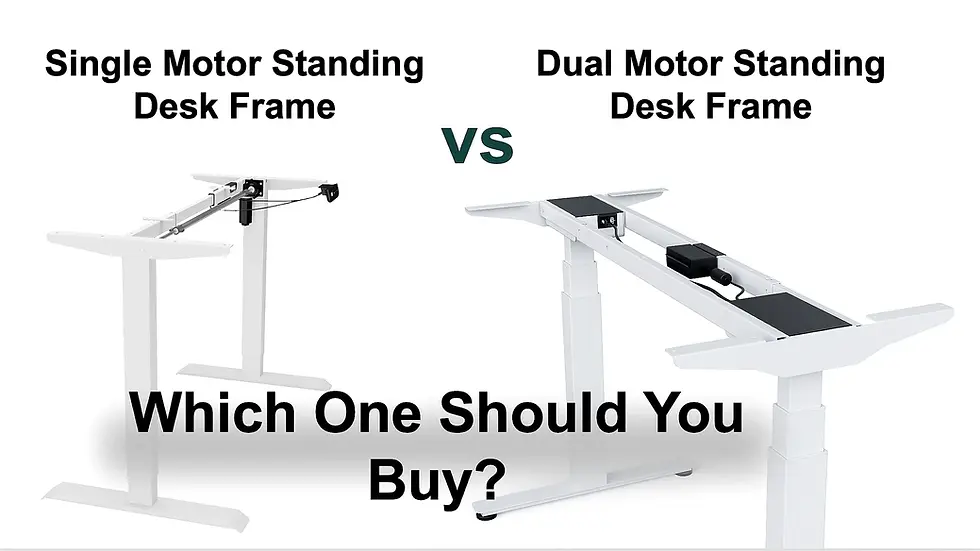
Mistake 1: choosing single motor when your setup needs dual motor
One of the most common mistakes is choosing a single-motor frame because it is cheaper, then using it with a setup that really needs more lifting power and stability.
A single-motor standing desk frame can be enough for a light setup:
Laptop
One monitor
Light tabletop
Simple home office use
Occasional height adjustment
But many modern desks are heavier than buyers expect.
A serious home office or gaming setup may include:
Two monitors
Monitor arm
Large tabletop
Speakers
Docking station
Cable tray
Power strip
Desk mat
Keyboard and mouse
Laptop stand
Extra accessories
At that point, a dual-motor standing desk frame is usually the safer choice.
A dual-motor frame is generally better for:
Dual-monitor setups
Heavier tabletops
Frequent sit-stand use
Gaming desks
Wider desks
Long-term upgrades
Shared workspaces
Better lifting smoothness
The goal is not only lifting the weight once. The frame should move smoothly, stay stable and avoid feeling strained every time you change height.
For most buyers, a dual-motor 2-leg frame is the best default choice. It gives enough flexibility for home office, gaming and future accessories without immediately jumping to a 3-leg or heavy-duty frame.
If your current tabletop is good but your fixed desk height is holding you back, start with standing desk frames instead of replacing the entire desk.
Mistake 2: ignoring real weight capacity
Many buyers check the frame’s maximum load capacity but forget to calculate the real weight of their setup.
The number that matters is not only the tabletop. It is everything the frame needs to lift and support.
Count:
Tabletop
Monitors
Monitor arms
Laptop
Docking station
Speakers
Keyboard
Mouse
Desk mat
Cable tray
Power strip
Chargers
Desk lamp
Under-desk accessories
Any mounted equipment
A tabletop alone can already be heavy. Add two monitors, monitor arms and accessories, and the total load grows quickly.
For a simple laptop setup, you do not need the strongest frame available. But for dual monitors, wide tabletops or gaming setups, extra load capacity gives useful headroom.
A higher load rating is not only about whether the desk can move. It also gives more confidence that the frame is not working near its limit every day.
That matters for:
Smooth movement
Long-term durability
Motor strain
Stability
Future upgrades
Heavy monitor arms
Larger tabletops
If your setup is already close to the maximum load rating, choose a stronger frame. A standing desk frame should not feel like it is barely handling your equipment.
For buyers who prefer a ready-matched frame and tabletop instead of choosing both separately, it can also help to compare electric standing desks.
Mistake 3: judging stability only by product photos
A standing desk frame can look solid in photos and still feel unstable at standing height.
Stability is one of the most important buying factors because the desk is used while you type, move the mouse, adjust monitors, rest your arms and work for hours.
The real test is not how the frame looks when lowered. The real test is how it behaves when raised.
Poor stability can cause:
Monitor wobble
Shaky typing
Annoying movement during mouse use
Less confidence at full height
Worse gaming experience
Distracting movement during calls
Less comfort for tall users
Stability depends on several factors:
Frame design
Leg quality
Foot size
Frame width
Tabletop size
Load distribution
Floor level
Assembly quality
Monitor arm placement
Height used
A wide tabletop on a weak or narrow frame can feel unstable. Heavy monitors mounted at the back can increase wobble. Uneven floors can also make the desk feel worse than expected.
For gaming, stability is especially important. If the desk moves when you flick, track or reposition your arm, the setup feels less precise. A stable desk base supports better mouse control, better monitor positioning and a cleaner gaming layout.
This is why a standing desk frame should not be chosen only by price. If your desk is the base of your home office and gaming setup, stability should be one of the first things you check.
Mistake 4: buying the wrong frame for your tabletop
A standing desk frame is only a good upgrade if it fits the tabletop properly.
Many buyers already have a tabletop they like. That is one of the main reasons to buy a frame instead of a complete standing desk. But not every tabletop is suitable for every frame.
Before buying a standing desk frame, check:
Tabletop width
Tabletop depth
Tabletop thickness
Tabletop weight
Frame width adjustment
Screw compatibility
Material strength
Recommended overhang
Mounting space underneath
Cable tray position
Control panel placement
A tabletop that is too thin, too heavy, too deep, too wide or too weak can create problems even with a good frame.
The most common issue is assuming that “any tabletop will work.” In reality, the tabletop and frame need to match.
A frame that is too narrow for a large tabletop may feel unstable. A tabletop that is too thin may not hold screws properly. A very heavy surface may reduce the useful load capacity for monitors and accessories.
A good height adjustable desk frame upgrade works best when the tabletop is:
Strong
Flat
Correctly sized
Compatible with the frame width
Thick enough for safe mounting
Not too heavy for the total load rating
If you are unsure whether to replace only the frame or buy a complete desk, read the full comparison: standing desk frame vs standing desk.
Mistake 5: choosing a 2-leg frame when you actually need 3-leg or heavy-duty
A 2-leg standing desk frame is the right choice for most standard desks. But it is not the right choice for every setup.
Some users need more support.
A 3-leg or heavy-duty standing desk frame can make more sense if you use:
L-shaped desk
Corner workstation
Very large tabletop
Heavy solid wood tabletop
Triple-monitor setup
Studio equipment
Multiple monitor arms
Wide gaming and work surface
Shared workstation
Heavy creative setup
Use this decision table:
Setup | Recommended frame |
Laptop + one monitor | Basic or dual-motor 2-leg frame |
Standard home office | Dual-motor 2-leg frame |
Dual monitors + accessories | Strong dual-motor 2-leg frame |
Large gaming tabletop | Stable dual-motor frame with wide support |
L-shaped desk | 3-leg standing desk frame |
Heavy workstation | Heavy-duty or 3-leg frame |
Studio / creator setup | Heavy-duty frame with high load rating |
A 2-leg frame can be excellent when matched correctly. But for large surfaces, unusual shapes or heavy equipment, a 3-leg frame gives better support and weight distribution.
This is especially relevant if your desk is both a work desk and a gaming desk. A large surface may need to support monitors, keyboard, mousepad, microphone arm, speakers, chargers and accessories without feeling unstable.
Do not choose a 2-leg frame only because it is cheaper if the setup clearly needs more structure.
Mistake 6: forgetting height range and body fit
A standing desk frame is not useful if it does not fit your body.
Many buyers focus on motor type and load capacity but forget height range. That is a mistake because the whole point of a sit-stand desk is to make the desk fit you better.
A good height range should work for:
Sitting posture
Standing posture
Your chair height
Your body height
Tabletop thickness
Keyboard and mouse position
Monitor height
Shared users if more than one person uses the desk
At sitting height, you should be able to keep:
Shoulders relaxed
Elbows close to a natural angle
Forearms near desk level
Wrists neutral
Feet stable on the floor or footrest
At standing height, you should not need to hunch, shrug your shoulders or bend your wrists awkwardly.
If the desk is too high, your shoulders may stay raised all day. If it is too low, you may lean forward or collapse your posture. Both problems can create fatigue over time.
This is one reason desk height can affect daily energy. If you often feel tired, stiff or tense at your desk, read our guide on why you feel tired at your desk by 2 PM.
A standing desk frame should make it easier to find the right working height, not just let the desk move up and down.
Mistake 7: ignoring cable management and gaming accessories
Cable management is not only about looks. It is more important on a standing desk because the desk moves.
When the frame rises and lowers, cables must have enough length and safe routing. If cables are too short or badly placed, they can pull on monitors, chargers, docking stations or power strips.
This matters even more for gaming setups and hybrid workstations.
A gaming or home office desk may include:
Monitor power cables
DisplayPort or HDMI cables
USB cables
Keyboard and mouse cables
Wireless receivers
Docking station
Laptop charger
Speakers
Microphone arm
Headset stand
LED lighting
Power strip
Cable tray
If you ignore cable planning, the desk may look clean at first but become annoying every time you change height.
A good setup should include:
Cable tray
Power strip mounted safely
Enough cable slack
Clean routing for monitor cables
Separate routing for power and USB cables
Easy access to chargers
No cable tension at standing height
No cables dragging on the floor
This is also where accessories matter. A standing desk frame gives the base, but the full setup depends on monitor placement, cable routing, mousepad space and accessory layout.
If you are building a gaming/work hybrid desk, also read our best FPS gaming mouse setup guide. It explains how desk size, mouse space, monitor position and setup consistency affect performance.
For the frame itself, cable management should be planned before the desk is fully assembled, not after everything is already mounted.
Which standing desk frame should you choose?
The right standing desk frame depends on your actual setup, not only your budget.
Use this table as a practical buying shortcut:
Your setup | Best choice |
Laptop-only home office | Basic electric frame or light dual-motor frame |
Laptop + one monitor | Dual-motor 2-leg frame if budget allows |
Standard home office | Dual-motor 2-leg frame |
Dual monitors + monitor arm | Dual-motor frame with higher load rating |
Gaming setup with large mousepad | Stable dual-motor frame with wide tabletop support |
Heavy tabletop | Heavy-duty standing desk frame |
Triple monitors | Heavy-duty or stronger dual-motor frame |
L-shaped workstation | 3-leg standing desk frame |
Shared workspace | Dual-motor frame with memory presets |
Studio / creator setup | Heavy-duty frame with strong load capacity |
For most buyers, the safest answer is simple:
Choose a dual-motor 2-leg standing desk frame unless your setup is very light or clearly needs a 3-leg frame.
A single-motor frame can be enough for light use, but a dual-motor frame is usually the better long-term choice for home office, gaming and future upgrades.
If you want to compare current options, start with the standing desk frames category.
Who should buy only the frame?
Buy only the standing desk frame if your current tabletop is strong, the size already fits your room, and the main problem is fixed height.
This is often the smartest upgrade for users who want:
A custom surface
A larger gaming desk
A stronger base
A heavy tabletop
Better long-term flexibility
A specific tabletop color or material
More control over the final desk size
A sit-stand desk frame is also a good choice if your current desk surface is already better than the standard tabletops included with many complete desks.
Buy a complete standing desk if you do not already have a suitable tabletop or want the simplest all-in-one solution.
Standing desk frame or full standing desk: which is better?
A standing desk frame is better if you already have a good tabletop or want to choose your own surface.
Choose a standing desk frame if:
You already own a strong tabletop
You want a custom size
You want a specific material or color
You need a large gaming surface
You want a stronger frame than your current desk base
You want to upgrade only the lifting base
A full standing desk is better if:
You do not have a suitable tabletop
You want the simplest buying process
You want frame and tabletop already matched
You do not want to check compatibility
You want a clean all-in-one solution
For many home office and gaming users, the frame is the smarter upgrade if the tabletop is already good. But if the current tabletop is weak, too small or not compatible, a complete electric standing desk may be easier.
For a deeper comparison, use the guide on standing desk frame vs standing desk.
Recommended Standesk buying path
If your goal is to improve your desk setup, do not start with the cheapest option. Start with the problem you want to solve.
If your desk is fixed-height but your tabletop is good, choose a standing desk frame.
If you want a complete desk with frame and tabletop included, compare electric standing desks.
If your setup includes dual monitors, a monitor arm, large tabletop or gaming accessories, prioritize a dual-motor frame with enough load capacity.
If you are building a large corner workstation, studio desk or heavy multi-monitor setup, consider a 3-leg or heavy-duty frame.
The right standing desk frame should make your workspace easier to use every day. It should support your equipment, your posture and your future upgrades.
Final advice: avoid the cheapest frame that barely fits your setup
The best standing desk frame is not always the most expensive. But it is rarely the weakest frame that only just meets the minimum requirements.
A good frame should give you margin:
Margin for weight
Margin for stability
Margin for future monitors
Margin for accessories
Margin for different working heights
Margin for better cable management
That margin is what makes the desk feel reliable after months of use.
If you are buying for a serious home office or gaming setup, choose the frame like you choose the foundation of the workstation. The tabletop, monitors, keyboard, mouse, accessories and cables all depend on it.
For most people in 2026, the best choice is a stable dual-motor standing desk frame with enough weight capacity, good height range and proper tabletop compatibility.
For larger or heavier setups, move up to a 3-leg or heavy-duty frame instead of forcing a standard frame to do too much.
Start with standing desk frames, compare load capacity and compatibility, then choose the frame that fits the desk you actually want to build.
FAQ
What is the best standing desk frame in 2026?
The best standing desk frame in 2026 is a stable electric frame with enough weight capacity for your tabletop, monitors and accessories, a height range that fits your body, smooth movement, memory presets and good cable-management options. For most users, a dual-motor 2-leg frame is the safest choice.
Is a dual motor standing desk frame worth it?
Yes, a dual motor standing desk frame is worth it for most home office and gaming setups. It is better for heavier tabletops, dual monitors, frequent height changes and long-term flexibility. A single motor frame can work for lighter setups, but dual motor is usually the safer choice.
Is a single motor standing desk frame enough?
A single motor frame can be enough for a light setup with a laptop, one monitor and a lighter tabletop. For dual monitors, monitor arms, heavy tabletops or gaming setups, a dual motor frame is usually better.
How much weight capacity do I need for a standing desk frame?
Add the weight of the tabletop, monitors, monitor arms, speakers, laptop, docking station, cable tray, power strip and accessories. Choose a frame with enough extra capacity so it is not working near its limit every day.
Are standing desk frames stable at full height?
Good standing desk frames can be stable at full height, but stability depends on frame design, leg quality, foot size, tabletop dimensions, load distribution, floor level and assembly. Larger or heavier setups need stronger frames.
What standing desk frame is best for gaming?
The best standing desk frame for gaming is usually a stable dual-motor frame with enough load capacity for a large tabletop, monitor arms, speakers, cable management and a wide mousepad area. For large gaming desks, choose a wider or stronger frame.
What standing desk frame is best for home office?
For most home offices, a dual-motor 2-leg standing desk frame is the best choice. It gives good stability, smooth adjustment and enough flexibility for monitors, laptop docks and accessories.
Is a 2-leg or 3-leg standing desk frame better?
A 2-leg frame is best for standard desks and most home office or gaming setups. A 3-leg frame is better for L-shaped desks, corner workstations, heavy tabletops and large multi-monitor setups.
Can I use any tabletop with a standing desk frame?
No. The tabletop must match the frame’s width range, depth recommendation, weight capacity and mounting requirements. It should also be thick and strong enough for safe screw installation.
What height range should a standing desk frame have?
A good frame should go low enough for comfortable sitting and high enough for comfortable standing. The right height range depends on your body height, chair, tabletop thickness and working posture.
Is a standing desk frame better than a full standing desk?
A standing desk frame is better if you already have a good tabletop or want a custom surface. A full standing desk is better if you want a simpler all-in-one solution with frame and tabletop already matched.
Is a standing desk frame good for dual monitors?
Yes. A dual-motor standing desk frame with enough load capacity is usually a good choice for dual monitors, especially if you use monitor arms. Count the weight of the tabletop, monitors, arms and accessories before choosing the frame.
What is the most stable standing desk frame type?
For most standard desks, a strong dual-motor 2-leg frame is stable enough. For large tabletops, L-shaped desks or heavy multi-monitor workstations, a 3-leg or heavy-duty frame usually provides better support.
Is a cheap standing desk frame worth it?
A cheap standing desk frame can be fine for a light laptop setup, but it may be a poor choice for dual monitors, heavy tabletops or frequent daily use. Stability, load capacity, motor quality and tabletop compatibility matter more than the lowest price.
What should I check before buying a standing desk frame?
Check motor type, weight capacity, stability, frame width, tabletop compatibility, height range, control panel, memory presets, cable management options, warranty and whether the frame fits your real setup.






























Comments