
Standing Desk Frame vs Standing Desk — Which Upgrade Makes More Sense in 2026?

Quick answer: should you buy a standing desk frame or a full standing desk?
A standing desk frame makes more sense if you already have a good tabletop, want a custom desk size, need stronger lifting capacity, or want to build a home office or gaming setup around your own surface.
A full standing desk makes more sense if you want the easiest all-in-one upgrade, do not already have a tabletop, or prefer a ready-matched frame and desktop combination.
For many home office users and gamers, the smarter long-term upgrade is often the frame. It gives more control over tabletop size, desk depth, weight capacity, layout and future upgrades. But it only works well if the tabletop is strong, correctly sized and properly fitted.
The best choice is not about which option sounds more premium. It is about what problem you are trying to solve: height adjustment, stability, space, ergonomics, gaming setup, home office comfort or long-term value.
Choose this | Best if |
Standing desk frame | You already have a tabletop, want custom size, use monitors or gaming gear, or need a stronger base |
Full standing desk | You want one complete package with frame and tabletop included |
Desk converter | You cannot replace your current desk yet |
Fixed desk | You rarely work long hours and do not need height adjustment |
Why this decision matters more than most buyers think
A standing desk is not just furniture. For many people, it becomes the main surface for work, gaming, studying, video calls, monitors, keyboards, chargers, speakers, lights and accessories.
That is why buying the wrong type of desk upgrade can become expensive.
If you buy a full standing desk when your existing tabletop was already perfect, you may pay for a surface you did not need. If you buy only a frame but reuse a weak or badly sized tabletop, the setup may feel unstable or awkward. If you choose a cheap frame without checking load capacity, it may struggle with heavy monitors, monitor arms, speakers or a thick desktop.
A good standing desk setup should feel stable, comfortable and easy to use every day. That depends on the frame, tabletop, height range, motor quality, desk depth, cable management and how your real setup is arranged.
This guide will help you choose between a standing desk frame and a full standing desk based on how you actually use your workspace.
What is a standing desk frame?
A standing desk frame is the adjustable base of the desk. It usually includes the legs, lifting columns, motor system, controller, feet and support structure. You attach your own tabletop to the frame.
In simple terms: the frame is what makes the desk move up and down.
A standing desk frame can be used to build:
A home office desk
A gaming desk
A large monitor workstation
A custom tabletop setup
A dual-monitor or triple-monitor setup
A compact desk for a small room
A heavy-duty workstation
The main advantage is flexibility. You can choose the tabletop size, material, depth, colour and layout separately from the frame.
This is why standing desk frames are popular with people who already have a good tabletop or want a more custom setup than a standard ready-made desk.
A good frame should be judged by:
Stability at sitting and standing height
Weight capacity
Motor type
Height range
Tabletop compatibility
Build quality
Warranty
Noise level
Control panel features
Cable management options
The frame is the part that decides whether your desk feels solid or shaky when raised. For heavy setups, it matters more than the tabletop colour or shape.
What is a full standing desk?
A full standing desk includes both the adjustable frame and the tabletop. It is the simpler option because the key parts are already matched together.
This is usually the better choice if you:
Do not already own a tabletop
Want one complete purchase
Do not want to measure tabletop compatibility
Prefer a ready-to-use desk system
Want the frame and top to visually match
Need a straightforward home office upgrade
A full standing desk is often easier for first-time buyers because there is less decision-making. You choose the size, colour and model, then assemble the complete desk.
The downside is flexibility. You are limited to the tabletop sizes, materials and colours available in that desk range. If you want a very specific size, extra-deep surface, custom material or special gaming layout, a frame-only setup may be better.
If you want the simplest route, compare electric standing desks with frame-only options before deciding.
Standing desk frame vs full standing desk: comparison table
Factor | Standing desk frame | Full standing desk |
Best for | Custom builds, gamers, heavy setups, existing tabletops | Simple all-in-one upgrade |
Cost flexibility | Often better if you already have a tabletop | Higher if desktop is included |
Custom size | Strong | Limited to available sizes |
Tabletop choice | Full control | Pre-selected options |
Stability | Depends heavily on frame quality | Depends on full desk design |
Assembly | Requires fitting your own tabletop | Usually more straightforward |
Gaming setup | Excellent for large custom surfaces | Good if the desk is large enough |
Heavy monitors | Choose a high-load frame | Check desk rating carefully |
Design control | High | Medium |
Best buyer | DIY/custom setup user | Convenience buyer |
The short version:
A standing desk frame gives you more control.
A full standing desk gives you more convenience.
What standing desk frame specs actually matter?
A standing desk frame should not be chosen only by price. The important specs are the ones that affect daily use: weight capacity, stability, height range, motor system, tabletop compatibility and warranty.
These details decide whether the desk feels solid after one week, not just whether it looks good in product photos.
Standing desk frame weight capacity
Weight capacity tells you how much the frame can lift safely.
Do not count only the tabletop. Add the full setup:
Tabletop
Monitors
Monitor arms
Laptop or PC accessories
Speakers
Docking station
Keyboard and mouse
Desk lamp
Cable tray
Chargers and accessories
Anything mounted under the desk
As a practical reference, a typical dual-monitor home office setup with monitor arms and accessories can easily reach 40–60 kg once the tabletop is included. A heavier gaming or creator setup with a thick tabletop, multiple monitors, speakers and arms can go higher.
For most serious home office or gaming setups, a frame rated around 80–100 kg or more gives more comfortable headroom than a basic low-capacity frame. For very large tabletops, triple monitors or heavy equipment, look at high-load or heavy-duty frames instead of choosing the cheapest option.
If your setup is close to the frame’s maximum capacity, choose a stronger frame. A desk frame should not feel like it is working at its limit every day.
This is where the standing desk frames category matters: compare the frame rating against the real weight of your tabletop and equipment, not just the desk size.
Standing desk frame stability
Stability matters most at standing height.
A frame can feel solid when sitting but less stable when raised. This is especially important for tall users, heavy tabletops, monitor arms and gaming setups where mouse movement should feel consistent.
Stability depends on:
Frame design
Leg structure
Feet size
Crossbar or support system
Tabletop size
Weight distribution
Floor surface
Assembly quality
If you use large monitors or a heavy tabletop, do not treat stability as a small detail. It is one of the main reasons to choose a better frame.
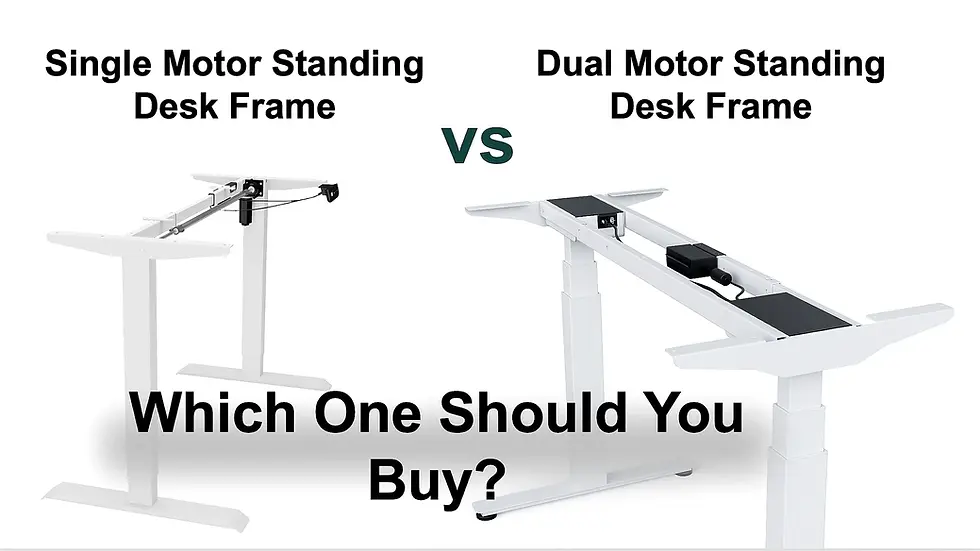
Single motor vs dual motor standing desk frame
Many electric standing desk frames use either single-motor or dual-motor systems.
A single-motor frame can be enough for lighter setups. A dual-motor frame is usually better for heavier desks, smoother lifting and more balanced movement.
For home office and gaming setups with monitors, arms and accessories, a dual-motor frame is often the safer choice.
A simple rule:
Setup type | Better frame choice |
Laptop-only desk | Single motor may be enough |
One monitor + light tabletop | Single or dual motor |
Dual monitors + monitor arm | Dual motor recommended |
Gaming setup with large tabletop | Dual motor recommended |
Heavy workstation / creator setup | High-load dual motor or heavy-duty frame |
Large corner / L-shaped setup | 3-leg frame |
For a standard home office with one or two monitors, a dual-motor standing desk frame Invictus is usually a safer long-term choice than a basic frame. For large tabletops, multiple monitors or heavy equipment, a heavy-duty standing desk frame Atlas gives more useful headroom.
Standing desk frame height range
Height range is one of the most important specs because it decides whether the desk fits your body when sitting and standing.
Many electric frames adjust roughly around the 60–125 cm range, but the exact range depends on the model. Shorter users should check that the frame can go low enough for comfortable sitting. Taller users should check that it can rise high enough without forcing them to bend forward.
A good sitting position usually means:
Shoulders relaxed
Elbows close to a 90-degree angle
Forearms level with the desk
Wrists neutral
Feet stable on the floor or footrest
A good standing position usually means:
Elbows close to desk height
Shoulders relaxed
Screen high enough to avoid neck bending
Keyboard and mouse not too high or too low
If you are shorter, taller, or buying for multiple users, do not skip height range. A frame with the wrong range can still be uncomfortable even if the motor and build quality are good.
Tabletop compatibility
Before buying a frame, check:
Minimum tabletop width
Maximum tabletop width
Recommended tabletop depth
Tabletop thickness
Maximum tabletop weight
Mounting requirements
Whether the frame width is adjustable
Whether the tabletop overhang will be reasonable
Do not assume every tabletop fits every frame.
If you already own a strong tabletop, a frame-only upgrade can make excellent financial sense because you are paying for the part you actually need: the adjustable base.
Warranty and long-term use
Warranty matters because the frame includes motors, electronics and lifting columns.
Some standing desk frames include longer warranty coverage depending on the model. Check the specific product page before buying instead of assuming every frame has the same warranty.
For a desk used every day, warranty, spare parts and frame quality matter more than saving a small amount on the cheapest option.
Cable management
Cable management is not only about looks.
A standing desk moves. That means power cables, monitor cables, chargers and accessories need enough slack and proper routing. Poor cable management can pull devices, create mess or limit desk movement.
For gaming and home office setups, plan cable management before the desk is fully assembled.
Is a standing desk frame hard to assemble?
A standing desk frame is not difficult for most buyers, but it does require more planning than buying a full desk.
The main difference is that you need to attach the frame to your own tabletop. That means checking the tabletop size, positioning the frame correctly, marking the mounting points and making sure the screws are suitable for the tabletop thickness.
Most electric frames include clear instructions and standard mounting hardware, but the final result depends on careful measuring and assembly.
Before installation, check:
Tabletop width and depth
Tabletop thickness
Where the frame will sit under the surface
Where the control panel will be mounted
Cable tray or cable routing position
Whether the tabletop material is suitable for screws
Whether you need help lifting or turning the desk over
For many users, assembly is a one-time task. The benefit is that you get a desk surface built around your room, setup and working style.
If you do not want to deal with tabletop compatibility or measuring, a complete standing desk is the simpler choice.
When should you buy a standing desk frame?
A standing desk frame is the smarter upgrade when you want flexibility, already own a suitable tabletop, or need a stronger base for a more serious setup.
You already have a good tabletop
If your current tabletop is solid, large enough and still looks good, replacing the whole desk may be unnecessary.
A frame lets you keep the surface you already like while adding electric height adjustment. This can be especially useful if the tabletop is made from solid wood, has a custom size, matches your room, or already fits your monitor and keyboard layout.
Before reusing it, check:
Is the tabletop strong enough?
Is it deep enough for your monitor and keyboard?
Is it wide enough for your setup?
Is the underside suitable for mounting?
Is the surface flat and stable?
Is the tabletop too heavy for the frame?
If the tabletop is weak, warped, too thin or too narrow, it may be better to buy a full standing desk or choose a new tabletop together with the frame.
You want a larger gaming desk
Gamers often need more horizontal space than standard office users.
A proper gaming setup may include:
Large mousepad
Angled keyboard
Gaming mouse
Monitor arm
Headset stand
Speakers
Stream deck
Microphone arm
Charging dock
PC accessories
Cable management
A standard full desk may not give enough surface depth or width for that. A standing desk frame allows you to choose a larger tabletop and build the setup around your actual gear.
This matters especially for low-sensitivity FPS players. If your mousepad space is limited by the keyboard, monitor stand or desk edge, your setup is already working against you.
For gamers, the desk frame is not just about standing. It is about creating a stable surface with enough space for mouse movement, monitor position and cable control.
You use multiple monitors or heavy equipment
If you use dual monitors, triple monitors, large speakers, monitor arms, docking stations or a heavy tabletop, frame quality becomes important.
A weak frame may technically lift the setup, but still feel unstable when raised. This is where load capacity and stability at standing height matter.
Do not calculate only the weight of the tabletop. Include everything that sits on or attaches to the desk.
If your setup is heavy, choose a frame with a comfortable safety margin rather than pushing the maximum limit.
You want better long-term value
A standing desk frame can be a better long-term investment because the tabletop can be changed later.
For example, you may start with a simple desktop now and upgrade to a larger or higher-quality surface later. Or you may move the frame to another room, change the colour scheme, or build a bigger setup.
With a full desk, the frame and tabletop are bought as one product. That is convenient, but less flexible.
A good frame gives you a base that can evolve with your workspace.
You need a custom size or room fit
Home offices are not always built around standard furniture sizes.
You may need:
A narrow desk for a small room
A wider tabletop for dual monitors
Extra depth for monitor distance
A surface that matches existing furniture
A custom top for a corner or wall space
A desk that works for both work and gaming
A standing desk frame gives more freedom because you can match the frame to a tabletop that fits the room, not the other way around.
When should you buy a full standing desk?
A full standing desk is usually the better choice when convenience matters more than customization.
You do not already have a suitable tabletop
If you do not own a strong tabletop, buying a frame alone may not save much. You still need to find a compatible top, check size, check thickness, prepare mounting and make sure the final desk is stable.
A full standing desk removes that problem.
You want the easiest setup
A full standing desk is simpler because the parts are designed to work together. The frame and tabletop are already matched by size and compatibility.
This is ideal if you want:
Less measuring
Less planning
Fewer compatibility questions
One purchase
A clean, matched look
You want a complete visual design
Some buyers care about the finished look more than custom flexibility. A full standing desk can be the better option if you want the top and frame to match visually without comparing separate parts.
You are buying for a simple home office
If your setup is mostly laptop, monitor, keyboard and mouse, a full standing desk may be more than enough. You may not need a special heavy-duty frame or custom tabletop.
For many home office users, a complete standing desk is the simplest path to better ergonomics.
Desk converter vs standing desk: when is a converter enough?
A desk converter sits on top of your existing desk and raises your monitor and keyboard to standing height.
It can be useful if:
You cannot replace your current desk
You are renting and want a temporary solution
You want to test standing while working
Your budget is limited
Your current desk is fixed but still usable
However, a converter is usually not as clean or flexible as a real standing desk frame or full standing desk.
Common downsides:
Less usable desk space
Higher keyboard position
More clutter
Limited monitor placement
Less stable than a full sit-stand setup
Not ideal for large gaming or multi-monitor setups
Awkward cable routing
Less comfortable for long daily use
If you use the desk for more than four hours a day, a proper standing desk frame or full electric standing desk is usually the better long-term upgrade. A converter can help temporarily, but it often does not solve the real problems: desk height, surface depth, monitor position, cable routing and stable workspace.
A converter can solve a short-term problem. A standing desk frame or full standing desk is usually the better route if the desk is your main daily work or gaming surface.
Best standing desk frame for gaming: when does it make sense?
For many gaming setups, a standing desk frame is often smarter than a fixed-size full desk.
The reason is simple: gamers usually care more about surface layout than average office users.
A gaming desk may need:
Wide mousepad area
Enough depth for monitor distance
Space for angled keyboard position
Monitor arm compatibility
Cable management
Headset and controller storage
Speakers or audio interface
Microphone arm
Lighting
Charging accessories
Strong frame stability
A standing desk frame allows you to choose the tabletop size around those needs.
This is especially useful if your setup is used for both gaming and work. During the day, you may need a clean home office layout. In the evening, the same desk may become a gaming setup with different posture, monitor position and mouse space.
Choose a frame for gaming if you want a larger tabletop, use monitor arms, play FPS games with a large mousepad, or need a stronger base for heavy equipment.
Choose a full standing desk if you want simple assembly and the available size already fits your setup.
For FPS players, desk size and stability directly affect mouse space, posture and aim consistency. We explain this in more detail in the best FPS gaming mouse setup guide.
For gaming/work hybrid setups, start with a strong standing desk frame if you want to choose your own tabletop size and build the surface around your equipment.
Best standing desk frame for home office: when does it make sense?
For home office workers, the decision depends on how much control you need over the surface.
A laptop-only user may not need a heavy-duty frame. But someone using two monitors, a docking station, monitor arm, desk lamp, keyboard, mouse and accessories should think more carefully about stability, height range and load capacity.
Choose a standing desk frame for home office if:
You already own a strong tabletop
You need a very specific desk size
You use monitor arms and a docking station
You want long-term flexibility
You work 6–8 hours daily at the same desk
You want to upgrade the base but keep the surface
Choose a full standing desk if:
You want the easiest upgrade
You do not already have a tabletop
You want a matched design
Your setup is simple or medium-weight
You do not want to check compatibility
For long workdays, the goal is not to stand all day. The goal is to switch position comfortably, reduce stiffness and make the desk fit your body.
Common buying mistakes
Buying a cheap frame without checking load capacity
A low price can become expensive if the frame struggles with your tabletop and equipment.
Reusing a weak tabletop
A frame upgrade will not save a tabletop that is too thin, warped, unstable or badly sized.
Choosing a frame too narrow for a large top
A large tabletop on a poorly matched frame can feel unstable. Always check the recommended tabletop size range.
Ignoring stability at standing height
Many frames look fine in pictures. What matters is how stable they feel when raised.
Forgetting monitor arms add weight
Monitor arms, especially with large screens, add meaningful load and change weight distribution.
Buying a full desk when only the frame needed replacing
If you already have a strong tabletop, a frame may be the smarter upgrade.
Buying a converter when the real issue is the full desk setup
A converter may help temporarily, but it often does not solve space, posture and cable problems properly.
Choosing only by price
The cheapest option is not always the best value. Stability, warranty, motor quality and load capacity matter more over time.
Ignoring future upgrades
Your setup may become heavier later. A stronger frame gives more room for monitors, arms and accessories.
Decision flow: what should you buy?
Use this simple guide.
Buy a standing desk frame if:
You already have a strong tabletop
You want a custom tabletop size
You use multiple monitors
You need a stronger frame
You want a gaming/work hybrid setup
You want long-term flexibility
You care about surface size and layout
Buy a full standing desk if:
You do not own a suitable tabletop
You want the easiest purchase
You want a matched desk design
You do not want to check compatibility
Your setup is simple or medium-weight
You want fast setup with fewer decisions
Buy a desk converter if:
You cannot replace your current desk
You need a temporary solution
You want to test sit-stand working
You have limited budget
Your setup is light and simple
Keep a fixed desk if:
You rarely work long hours
You do not need height adjustment
Your current setup is already comfortable
You prefer a traditional desk and move often away from it
For most serious home office and gaming users, the real choice is between a standing desk frame and a full standing desk.
If your main problem is afternoon fatigue, shoulder tension or low energy at your workstation, read our guide on why you feel tired at your desk before choosing your next upgrade.
Recommended Standesk path
The easiest way to choose is to start with your real setup.
If you already have a strong tabletop or want a custom surface, start with standing desk frames. This is usually the best route when you care about size, load capacity, stability and long-term flexibility.
If you want one complete upgrade with frame and tabletop included, compare standing desks. This is the simpler option if you do not want to choose a tabletop separately.
If your setup is heavy, wide or built around multiple monitors, choose a stronger frame with enough load capacity rather than a basic frame working near its limit. A heavy-duty standing desk frame Atlas is usually the safer option for large tabletops, monitor arms, speakers and gaming equipment.
If you are building a corner workstation, studio setup or large multi-monitor desk, consider a 3-leg standing desk frame Tribes instead of forcing a large surface onto a standard two-leg frame.
The right upgrade should make your desk easier to use every day: correct height, stable surface, enough space and a layout that fits the way you actually work or play.
Final advice: choose the upgrade that solves your real problem
A standing desk frame and a full standing desk can both be good choices. The wrong choice is buying one without thinking about how you actually use the desk.
Choose a standing desk frame if you want flexibility, already have a good tabletop, need a stronger base or want to build a custom gaming/home-office setup.
Choose a full standing desk if you want the easiest complete upgrade and do not already have a suitable tabletop.
Choose a converter only if you need a temporary solution or cannot replace your current desk yet.
The best upgrade is not always the most expensive one. It is the one that gives you the right height, enough space, strong stability and a setup you can use comfortably every day.
If you are ready to build the desk around your own tabletop, monitor setup and daily routine, start with Standesk standing desk frames. If you want the simplest complete upgrade, compare electric standing desks.
FAQ
Is a standing desk frame worth it?
Yes, a standing desk frame is worth it if you already have a good tabletop, want a custom desk size or need a stronger adjustable base for monitors, gaming gear or home office equipment. It gives more flexibility than buying a complete desk, but only if the tabletop is suitable.
Is it cheaper to buy a standing desk frame?
It can be cheaper if you already own a suitable tabletop. If you still need to buy a new tabletop separately, the final cost may be similar to a full standing desk. The main advantage of a frame is flexibility, not always the lowest price.
Can I put any tabletop on a standing desk frame?
No. The tabletop must match the frame’s recommended width, depth, thickness and weight limits. It also needs to be strong enough for mounting and stable enough for daily use. Always check compatibility before buying.
Is a standing desk frame better than a full standing desk?
A standing desk frame is better if you want customization, already have a good tabletop or need a stronger frame for a specific setup. A full standing desk is better if you want a complete, easier purchase with frame and tabletop included.
Are standing desk frames stable?
Good standing desk frames can be stable, but stability depends on frame quality, tabletop size, weight distribution, assembly and height. Stability becomes especially important at standing height and with heavy monitor setups.
What weight capacity do I need for a standing desk frame?
Add the weight of the tabletop, monitors, monitor arms, speakers, laptop, accessories and anything mounted under the desk. A typical dual-monitor setup can reach 40–60 kg with the tabletop included, so many home office or gaming users should look for frames rated around 80–100 kg or more.
What height range should a standing desk frame have?
Many electric frames adjust roughly around 60–125 cm, but the exact range depends on the model. Check that the frame goes low enough for your sitting posture and high enough for your standing height, especially if you are shorter, taller or sharing the desk with another user.
Is a standing desk frame good for gaming?
Yes, a standing desk frame can be excellent for gaming because it lets you choose a larger tabletop, create more mouse space, use monitor arms and build a custom work/gaming setup. For heavy gaming setups, choose a frame with strong stability and load capacity.
Should I buy a 2-leg or 3-leg standing desk frame?
A 2-leg frame is suitable for most standard desks. A 3-leg frame is better for larger corner desks, L-shaped setups or heavier workstations where more support is needed.
Is dual motor better for a standing desk frame?
Dual-motor frames are usually better for heavier setups because they lift more smoothly and distribute movement across both legs. A single-motor frame can still work for lighter setups, but dual motor is often the safer choice for serious home office or gaming use.
Is a standing desk frame hard to assemble?
A standing desk frame is usually manageable to assemble, but it requires measuring and attaching the frame to your tabletop. Most frames include instructions and hardware, but you should check tabletop size, thickness, mounting position and cable routing before installation.
What is better: standing desk frame or desk converter?
A standing desk frame is usually better for a long-term ergonomic setup because it adjusts the whole desk surface. A desk converter is useful when you cannot replace your desk yet, but it often gives less space and a less clean setup.
How do I choose the right standing desk frame?
Choose by tabletop compatibility, load capacity, stability, height range, motor type, warranty and your actual setup weight. Do not choose only by price.
Are standing desk frames good for home offices?
Yes. Standing desk frames are good for home offices because they allow custom sizing, flexible tabletop choice and better long-term adjustment. They are especially useful if you already own a tabletop or use monitors, docking stations and accessories.































Comments