
Two-Stage vs Three-Stage Standing Desk Frame: Which Height Range Do You Need in 2026?
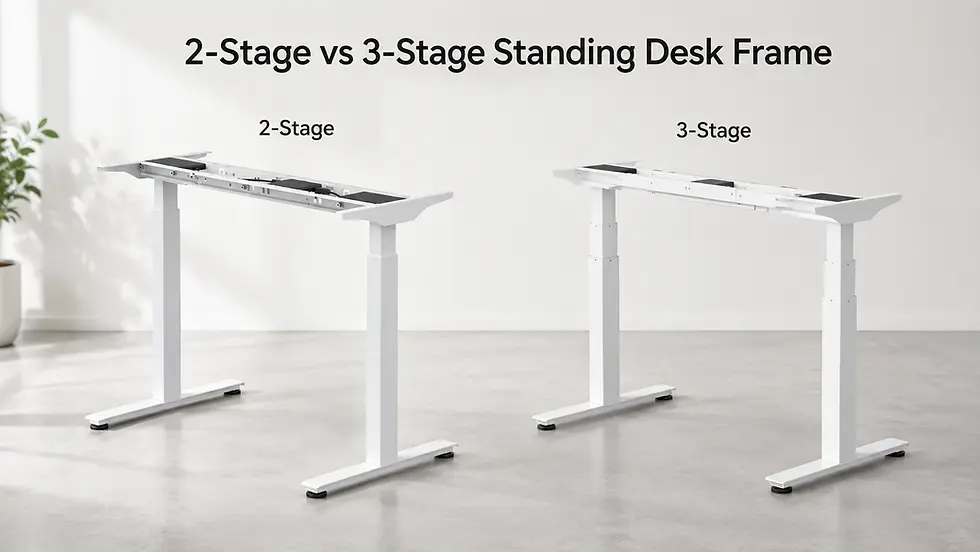
Quick answer: should you buy a two-stage or three-stage standing desk frame?
Choose a two-stage standing desk frame if you are close to average height, use a standard tabletop, work alone at the desk and do not need an unusually low sitting position or unusually high standing position.
Choose a three-stage standing desk frame if you are shorter, taller, buying for a child or teenager, sharing the desk with another person, using a thicker tabletop, using a chair with armrests, or want a wider ergonomic height range.
The mistake many buyers make is thinking this question is only about how high the desk can go.
It is not.
A standing desk frame must work in two positions:
Low enough for comfortable sitting
High enough for comfortable standing
If either position is wrong, the desk will not feel ergonomic, even if the motor is strong, the tabletop looks premium and the desk technically moves up and down.
For many people, the bigger problem is not standing height. It is sitting height.
A desk that does not go low enough can force your shoulders up, bend your wrists, push your chair too high or make your feet lose proper contact with the floor. This is especially important for shorter users, children, teenagers and people working from home without shoes.
User / setup | Better choice |
Average-height adult, simple setup | Two-stage can be enough |
Shorter adult | Three-stage usually safer |
Child or teenager | Three-stage strongly recommended |
User above 185–190 cm | Three-stage usually safer |
Shared desk | Three-stage |
Thick tabletop | Three-stage recommended |
Chair with armrests | Three-stage recommended |
Gaming setup | Usually three-stage or stronger frame |
Dual monitors / monitor arm | Three-stage or stronger frame |
Heavy tabletop | Heavy-duty frame with correct height range |
Unsure what you need | Three-stage gives more flexibility |
If you are comparing frames now, start with standing desk frames and check both the minimum height and maximum height, not only the lifting capacity.
What does two-stage mean on a standing desk frame?
A two-stage standing desk frame has legs made from two telescoping sections.
In simple terms, each leg has fewer moving sections and usually a more limited height range. Two-stage frames are often more affordable and can work well for standard home office setups.
A two-stage frame can be a good choice when:
You are close to average adult height
You use a normal office chair
Your tabletop is not very thick
You do not need the desk very low
You do not need the desk very high
The desk is used mainly by one person
Your setup is light or medium
You have checked that the height range fits you
The risk is that a two-stage frame may not go low enough for comfortable sitting or high enough for comfortable standing.
That is why two people with the same overall height can still need different desk heights. One person may have longer legs. Another may have a longer torso. One may sit higher. Another may need the desk lower because of shoulder position.
The frame does not know your body. You need to choose the range before buying.
What does three-stage mean on a standing desk frame?
A three-stage standing desk frame has legs made from three telescoping sections.
That usually gives a wider height range. In many cases, the desk can go lower at the bottom and higher at the top compared with a two-stage design.
A three-stage frame is usually better when:
You want a wider ergonomic range
You are shorter than average
You are taller than average
The desk is for a child or teenager
Two people share the desk
You use a thicker tabletop
You use a chair with armrests
You work barefoot or in slippers at home
You use monitor arms
You want more long-term flexibility
A three-stage frame is not automatically better in every possible way. It still needs good construction, correct tabletop compatibility, enough lifting capacity and proper assembly.
But for height range, three-stage is usually the safer choice.
It gives the desk more room to adapt to the user, instead of forcing the user to adapt to the desk.
Two-stage vs three-stage standing desk frame comparison
Feature | Two-stage frame | Three-stage frame |
Leg design | Two telescoping sections | Three telescoping sections |
Height range | Usually smaller | Usually wider |
Minimum height | Often higher | Often lower |
Maximum height | Often lower | Often higher |
Best for | Average-height users and simple setups | Kids, shorter users, tall users and shared desks |
Shared desk use | Less ideal | Better |
Thick tabletop | Can reduce ergonomic comfort | More forgiving |
Chair armrest clearance | Can be tighter | Usually easier |
Long-term flexibility | Lower | Higher |
Price | Often lower | Usually higher |
Best buying logic | Budget/simple setup | Ergonomic range and future-proofing |
The important point is this:
Two-stage vs three-stage is mainly a height-range decision, not only a price decision.
If the height range fits your body and setup, a two-stage frame can work well.
If the height range is too limited, the cheaper frame can become expensive because the desk never feels right.
Standing desk frame height by user height
This is the part many buyers should check before anything else.
Your height does not give the full answer, but it gives a very useful starting point.
User height / situation | Safer frame direction |
Child / teenager | Three-stage frame |
Shorter adult | Three-stage frame |
Average-height adult | Two-stage or three-stage, depending on setup |
185–190 cm and above | Three-stage frame usually safer |
Very tall user | Three-stage frame with strong stability at height |
Shared family desk | Three-stage frame |
Office hot desk | Three-stage frame |
Thick tabletop setup | Three-stage frame |
Gaming / dual-monitor setup | Three-stage or stronger frame |
For children and teenagers, the key issue is usually the lowest position. A two-stage frame may simply not go low enough for a proper seated position.
For taller users, especially above roughly 185–190 cm, the key issue is often maximum height and stability when the frame is extended.
A three-stage frame is not only “more premium”. It can solve real fit problems for users at both ends of the height range.
Why minimum height matters more than buyers think
Most buyers check how high a standing desk can go.
Fewer buyers check how low it can go.
That is a mistake.
For sitting, your desk should let your shoulders relax while your elbows stay close to a natural typing angle. If the desk is too high, your body starts compensating.
You may:
Raise your chair too high
Lose proper foot contact with the floor
Shrug your shoulders
Bend your wrists upward
Push the keyboard too far away
Lean forward
Feel neck or shoulder tension after a few hours
This is why a standing desk can still feel bad even when it is expensive.
The frame may lift smoothly. The tabletop may look great. But if the lowest height is too high for your seated posture, the setup is wrong from the start.
This matters even more if you use:
A thick tabletop
Chair with armrests
Shorter body height
Compact home office chair
Gaming chair
Keyboard tray
Barefoot or slipper working style at home
At home, many people work without shoes. That small detail can change the real height you need. A desk that feels fine in an office with shoes may feel too high at home.
Why three-stage frames are better for kids and teenagers
A three-stage standing desk frame is usually the better choice for children and teenagers because it can often adjust lower than a two-stage frame.
This matters for sitting.
If a desk is too high for a child, the usual “fixes” are not really fixes:
Raise the chair
Add a footrest
Let the shoulders lift
Let wrists bend upward
Let the child sit too far from the desk
That may work for a few minutes, but it is not a good daily setup.
A child or teenager needs a desk that can come down to their real seated working height. This is especially important for homework, drawing, typing, gaming or studying for long periods.
A three-stage frame is also better if the desk should grow with the child.
Instead of replacing the desk later, the same frame can cover a wider range as the user gets taller.
For family workspaces, kids’ rooms and shared home offices, three-stage is usually the safer long-term choice.
Why three-stage frames are better for tall users above 185–190 cm
Tall users should be careful with two-stage frames.
For users around 185–190 cm and above, the issue is usually the upper working height.
A frame may technically go high enough to stand, but still not feel correct for typing, mouse use or monitor position.
If the desk is too low when standing, you may:
Lean forward
Drop your head
Round your shoulders
Bend your wrists
Place the monitor too low
Stop using standing mode because it feels awkward
A three-stage frame usually gives more upper height range, which makes it safer for taller users.
But tall users should not look only at maximum height. They should also think about stability at that height.
A desk raised high will always show movement more easily than a desk in a low position. If you are tall and also use dual monitors, monitor arms or a heavy tabletop, choose the frame by height range, lifting capacity and stability together.
The hidden variable: tabletop thickness
Tabletop thickness changes the final working height.
If you compare only frame specifications, you may miss this.
Your actual working surface is usually:
Frame height + tabletop thickness
That means a thicker tabletop can make the desk surface higher in the sitting position.
This can be good or bad.
For standing, a thicker tabletop may help the desk reach a comfortable height.
For sitting, it may make the desk too high if the frame does not go low enough.
This is why solid wood, butcher-block and IKEA-style tabletops need more attention. They can look better and feel more premium, but they may be thicker and heavier than basic office surfaces.
Before choosing a frame, check:
Minimum frame height
Maximum frame height
Tabletop thickness
Tabletop weight
Your seated elbow height
Your standing elbow height
Chair height
Whether you work with shoes or without shoes
This is one of the most practical reasons to choose a three-stage frame. It gives more room to correct the final height after the tabletop is added.
Chair armrests can change the decision
Chair armrests are another detail buyers forget.
If your desk does not go low enough, your chair armrests may hit the tabletop. Then you have three bad options:
Raise the desk too high
Lower the chair too much
Sit farther away from the desk
None of these is ideal.
A desk that works on paper may become annoying in daily use if the chair cannot slide under it properly.
This is especially common in home offices where people use gaming chairs, executive chairs or ergonomic chairs with larger armrests.
Before buying a frame, check whether your chair can move close enough to the desk at the height you actually want to use.
A three-stage frame can help because it usually offers a lower minimum height and more adjustment room.
Is a three-stage standing desk frame more stable?
Not automatically.
This is where many articles oversimplify the topic.
A three-stage frame usually gives a wider height range. But stability depends on more than the number of stages.
It also depends on:
Steel thickness
Leg design
Frame width
Foot size
Crossbar design
Tabletop size
Tabletop depth
Load distribution
Monitor arm placement
Floor level
Assembly quality
How high the desk is raised
A bad three-stage frame can still wobble.
A good two-stage frame can still be stable within its intended range.
The better way to think about it:
Three-stage helps with height range. Good frame design helps with stability. You need both if the setup is large, tall or heavy.
If your main concern is load, read the full standing desk frame weight capacity guide.
Does a three-stage frame reduce wobble at full height?
Sometimes, but not by magic.
At full height, every standing desk becomes more sensitive to movement. The legs are extended, the monitor is higher, and small movements become easier to see.
A three-stage frame can help if it gives better usable range and keeps the desk from feeling like it is always operating at the edge of comfort.
But wobble is also affected by the tabletop and accessories.
Monitor arms are especially important. They can make screen movement more visible because the monitor sits away from the tabletop and often toward the back edge of the desk.
If you use monitor arms, dual monitors or a deep tabletop, do not choose by leg stages alone.
Check:
Height range
Weight capacity
Frame width
Tabletop size
Monitor arm placement
Whether the frame is designed for your setup
For dual monitors or heavier desks, the frame choice should consider both height range and load capacity.
Who should buy a two-stage standing desk frame?
A two-stage standing desk frame can be the right choice if your needs are simple and the height range fits you.
Choose two-stage if:
You are close to average adult height
You use a standard tabletop
You do not need a very low sitting position
You do not need a very high standing position
The desk is used by one person
You use one monitor or a light setup
Budget matters
You have already checked the minimum and maximum height
A two-stage frame is not a bad frame by default.
It becomes a bad choice when buyers assume it will fit everyone.
If the height range works for your body, chair and tabletop, two-stage can be practical.
If you are unsure, three-stage is usually safer.
Who should buy a three-stage standing desk frame?
A three-stage standing desk frame is the better choice when ergonomic flexibility matters.
Choose three-stage if:
The desk is for a child or teenager
You are shorter than average
You are taller than 185–190 cm
You share the desk
You use a thick tabletop
You use a chair with armrests
You work barefoot at home
You use dual monitors
You use monitor arms
You want better long-term flexibility
You want the desk to adapt to future changes
Three-stage is also a safer choice if the desk will be used for both work and gaming.
Gaming setups often have deeper tabletops, larger mouse areas, monitor arms, speakers, microphones and other accessories. The sitting and standing positions need to work naturally because small discomforts become noticeable during long sessions.
For gaming workspace setup ideas, read Best FPS Gaming Mouse Setup 2026.
What about heavy-duty standing desk frames?
Two-stage vs three-stage is important, but it is not the only decision.
For heavy setups, you also need to think about lifting capacity and structure.
A wider height range does not replace load capacity.
If you use a heavy tabletop, dual monitors, studio equipment or a large workstation, you may need a heavy-duty frame, not just a three-stage frame.
For example, in the Standesk range:
Fortis is better for lighter and medium setups
Invictus gives more strength for larger desks and long tabletops
Atlas is a heavy-duty frame with 200 kg lifting capacity and additional crossbar support
Atlas Pro is a four-leg / four-column heavy-duty frame with 250 kg lifting capacity
Tribes is better for L-shaped and corner workstations
This is where buyers should be careful.
A three-stage frame with the wrong load capacity is still the wrong frame.
A heavy-duty frame with the wrong height range can also be wrong.
You need both:
Correct height range
Correct lifting capacity
Start with standing desk frames, then compare the frame type by your height, tabletop and setup weight.
Two-stage vs three-stage for home office
For a simple home office, two-stage can be enough.
But for a serious daily work setup, three-stage is often worth considering.
If you work from home only occasionally, a basic frame may be fine.
If you work at the desk every day, small ergonomic errors matter more.
A daily home office setup may include:
Laptop
External monitor
Keyboard
Mouse
Docking station
Cable tray
Desk lamp
Chair with armrests
Occasional standing work
That is enough to make height range important.
If the desk is your main workplace, do not choose only by price. Choose by how well the frame fits your real sitting and standing positions.
Two-stage vs three-stage for gaming setups
For gaming, three-stage is usually the safer choice if the budget allows.
Gaming setups are rarely just a laptop and keyboard.
They often include:
Larger tabletop
Large mousepad
Monitor arm
Second monitor
Speakers
Microphone arm
Headset stand
Cable tray
LED lighting
PC accessories
Gaming also makes small desk problems more obvious. If the desk is slightly too high, your shoulder position changes. If it wobbles, the monitor movement becomes distracting. If the chair armrests hit the tabletop, you sit too far back.
A gaming desk should support long sessions comfortably. That means height range, stability and weight capacity all matter.
For most gaming setups, do not choose a frame only because it is cheaper. Choose the one that fits your seated position, standing position and equipment.
How to check the right height range before buying
Use this practical checklist before choosing a frame.
1. Check your seated working height
Sit in your chair as you normally work.
Relax your shoulders.
Keep elbows close to a natural typing angle.
Now ask:
Where should the tabletop surface be?
Will the frame go low enough after the tabletop is installed?
Will my chair armrests fit under the desk?
Will I need to raise the chair too high?
If the desk cannot go low enough, choose a wider-range frame.
2. Check your standing working height
Stand naturally.
Relax your shoulders.
Keep your elbows close to a comfortable typing angle.
Now ask:
Will the frame go high enough?
Will the monitor also be high enough?
Will the keyboard and mouse feel natural?
Will I be leaning forward?
If the desk cannot go high enough, choose a three-stage or taller-range frame.
3. Add tabletop thickness
Do not forget the tabletop.
A thicker tabletop raises the final surface height.
This can make the sitting position worse if the frame already starts too high.
4. Consider shoes, slippers or barefoot work
Home office users often work barefoot or in slippers.
That changes the real height needed compared with office use.
If you tested desk height at work while wearing shoes, do not assume the same height will feel perfect at home.
5. Think about future users
Will the desk be used by:
A child?
A teenager?
A partner?
A taller family member?
Multiple office users?
Someone above 185–190 cm?
If yes, choose more height range than you need for only yourself.
6. Think about future equipment
Will you add:
Monitor arm?
Second monitor?
Thicker tabletop?
New chair?
Gaming setup?
Larger desk surface?
If yes, choose more range than you need today.
Common mistakes when choosing two-stage vs three-stage
Mistake 1: checking maximum height only
Standing height matters, but sitting height often causes more daily discomfort.
Always check minimum height.
Mistake 2: ignoring children and shorter users
A desk that works for an adult may be too high for a child or teenager. Three-stage frames are usually safer for younger users because they can often adjust lower.
Mistake 3: ignoring tall users
Users above 185–190 cm should pay close attention to maximum height and stability when standing. A frame that works for average-height users may not feel comfortable for taller users.
Mistake 4: ignoring tabletop thickness
The frame does not define the final work surface alone. The tabletop adds height.
Thick tabletops can make a desk too high when sitting.
Mistake 5: assuming three-stage always means stable
Three-stage usually means wider height range. Stability still depends on build quality, frame design, tabletop size and load distribution.
Mistake 6: buying for today’s setup only
You may add a monitor arm, heavier tabletop or second screen later. Buy a frame that gives room for changes.
Mistake 7: ignoring the chair
Your chair and desk must work together.
If the chair armrests hit the tabletop, or the chair needs to be raised too high, the frame is not a good ergonomic match.
Mistake 8: choosing the cheapest frame for daily work
A budget frame can be fine for occasional use.
But if this is your main work or gaming desk, height range should not be an afterthought.
Recommended Standesk buying path
Start with your body and setup, not with the cheapest frame.
Ask:
How tall am I?
Is the desk for an adult, child or teenager?
How low does the desk need to go when sitting?
How high does it need to go when standing?
How thick is the tabletop?
Will I use chair armrests?
Will the desk be shared?
Will I use monitor arms?
Is the setup light, medium or heavy?
Will this be used for work, gaming or both?
Then choose the frame direction.
If you want to compare frame types, start with standing desk frames.
If you do not already have a suitable tabletop and want a ready-to-use setup, compare electric standing desks.
If your main question is load, read How Much Weight Can a Standing Desk Frame Hold?.
If you are comparing motors, read Single Motor vs Dual Motor Standing Desk Frame.
If you are still deciding between a frame-only upgrade and a complete desk, read Standing Desk Frame vs Standing Desk.
Final recommendation
A two-stage standing desk frame can be enough if your setup is simple, your height is average and the minimum and maximum height both fit your body.
A three-stage standing desk frame is usually the safer choice if you want better ergonomic range, share the desk, use a thick tabletop, need a lower sitting position, need a higher standing position or plan to upgrade the setup later.
For children and teenagers, three-stage is usually the better choice because the desk can often adjust lower.
For users above 185–190 cm, three-stage is usually the better choice because it gives more standing height range.
Do not buy three-stage only because it sounds premium.
Buy it because the height range solves a real problem.
The right standing desk frame should let you sit naturally, stand naturally and adjust without forcing your shoulders, wrists, chair or monitor into awkward positions.
That is the real difference between a desk that simply moves and a desk that actually works.
FAQ
What is the difference between a two-stage and three-stage standing desk frame?
A two-stage standing desk frame has two telescoping leg sections and usually a smaller height range. A three-stage frame has three telescoping sections and usually offers a wider height range, often going lower and higher than two-stage designs.
Is a three-stage standing desk frame better?
A three-stage frame is better if you need a wider height range, lower sitting position, higher standing position or shared-desk flexibility. It is not automatically better for every buyer, because stability and quality also depend on frame design and construction.
Is a two-stage standing desk frame enough?
A two-stage frame can be enough for average-height users with a standard tabletop and simple setup. It may not be ideal for children, shorter users, taller users, thick tabletops, shared desks or users who need more ergonomic range.
Are three-stage standing desk frames better for kids?
Yes, three-stage standing desk frames are usually better for kids and teenagers because they can often adjust lower than two-stage frames. This helps create a better seated position and lets the desk grow with the user.
Do short users need a three-stage standing desk frame?
Shorter users often benefit from a three-stage frame because the desk can usually go lower. This helps avoid raised shoulders, poor wrist position and needing to lift the chair too high.
Do tall users need a three-stage standing desk frame?
Tall users, especially around 185–190 cm and above, often benefit from a three-stage frame because it usually offers more maximum height. Tall users should also check stability at standing height, monitor height and tabletop depth.
Does a three-stage standing desk frame wobble less?
Not automatically. A three-stage frame can help with usable height range, but wobble also depends on leg design, steel quality, frame width, foot size, tabletop size, monitor arms, load distribution and assembly.
What height range do I need for a standing desk frame?
You need a frame that goes low enough for comfortable sitting and high enough for comfortable standing after the tabletop is installed. Check seated elbow height, standing elbow height, tabletop thickness and chair height before buying.
Why is minimum desk height important?
Minimum height matters because a desk that cannot go low enough can force your shoulders up, bend your wrists, make your chair too high or prevent your feet from resting properly on the floor.
Does tabletop thickness affect standing desk height?
Yes. Tabletop thickness adds to the final working height. A thick tabletop can make the desk surface too high in the sitting position if the frame does not go low enough.
Are three-stage frames better for gaming desks?
Often yes. Gaming setups usually use larger tabletops, monitor arms, deeper surfaces and longer sessions. A three-stage frame gives more height flexibility, but weight capacity and stability still matter.
Are three-stage frames better for home office?
For daily home office use, three-stage is often worth considering because it gives more ergonomic flexibility. For occasional light work, a two-stage frame can be enough if the height range fits.
Should I choose two-stage or three-stage for dual monitors?
For dual monitors, three-stage is usually safer if you also need better height range. But for heavier dual-monitor setups, also check load capacity and frame stability.
Is two-stage or three-stage better for an IKEA-style tabletop?
It depends on the tabletop thickness, weight and your required height range. A thicker tabletop can make the sitting position higher, so a three-stage frame may be safer.
Does three-stage mean higher weight capacity?
No. Three-stage describes leg extension design and height range. Weight capacity depends on motors, frame structure, columns, steel quality and overall design.
What should I check before buying a standing desk frame?
Check minimum height, maximum height, tabletop thickness, lifting capacity, frame width, tabletop compatibility, chair armrest clearance, monitor arm use, user height and whether the desk will be shared.






























Comments